Free Code Compiler
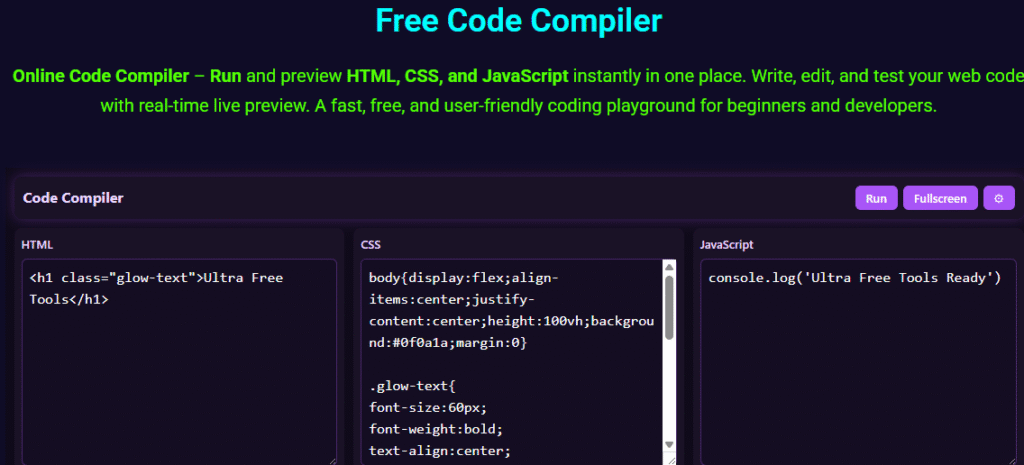
Online Code Compiler – Run and preview HTML, CSS, and JavaScript instantly in one place. Write, edit, and test your web code with real-time live preview. A fast, free, and user-friendly coding playground for beginners and developers.
Code Compiler – Free Online HTML, CSS & JavaScript Compiler
Are you looking for a seamless way to test your web projects without installing heavy software? Our Code Compiler provides a lightweight, browser-based environment perfect for developers of all skill levels.
Whether you are a beginner learning the basics or a pro prototyping a new idea, this versatile tool simplifies your workflow. You can write, edit, and preview your work instantly in one unified space
This html css javascript compiler is designed to save you time and effort. By using a free code editor online, you eliminate the need for complex local setups. Simply open your browser, type your logic, and see the results in real-time.
We invite you to explore this online code compiler and discover how it can streamline your daily development tasks. Let’s dive into the features that make this platform a must-have for your digital toolkit.
Key Takeaways
- Access a powerful development environment directly through your web browser.
- Test your front-end projects instantly without any software installation.
- Enjoy a clean, user-friendly interface designed for maximum productivity.
- Save time by prototyping your ideas in a single, integrated workspace.
- Benefit from a completely free solution that supports modern web standards.
The Power of a Modern Code Compiler
Modern code compilers have transformed the web development process by providing an integrated environment where developers can write, test, and debug their code efficiently. An online IDE for web development offers a suite of tools that simplify the coding process, making it more accessible and manageable.
Online IDEs have become indispensable for developers due to their ability to facilitate collaboration, provide instant compilation, and offer a range of development tools in one place. This integration enhances the overall development experience, allowing developers to focus on writing high-quality code.
Understanding the Role of Online IDEs
An online IDE serves as a comprehensive platform for web development, incorporating features such as code editing, debugging, and version control. The live code editor online functionality allows developers to see the results of their code in real-time, streamlining the development process.
- Simplifies code development and testing
- Enhances collaboration among developers
- Provides instant compilation and feedback
How Instant Compilation Enhances Productivity
Instant compilation is a key feature of modern code compilers, enabling developers to run code online and see the results immediately. This capability significantly enhances productivity by reducing the time spent on testing and debugging.
With instant compilation, developers can identify and fix errors more efficiently, leading to faster development cycles. This feature is particularly beneficial for beginners and experienced developers alike, as it provides immediate feedback on code syntax and execution.
The combination of online IDEs and instant compilation has revolutionized the web development landscape. By leveraging these tools, developers can work more efficiently, collaborate more effectively, and produce high-quality code.
Key Features of Our Online HTML CSS JavaScript Compiler
The key to streamlined web development lies in the features of our online html css js editor online, which is designed to make coding faster and more intuitive. Our frontend code compiler is packed with tools that enhance productivity and simplify the development process.
Live Preview Functionality
One of the standout features of our compiler is its live preview functionality. This allows developers to see the results of their code in real-time, making it easier to test and refine their work. With live preview, you can instantly view changes made to your HTML, CSS, and JavaScript code, significantly speeding up the development cycle.
Here are some benefits of live preview:
- Instant feedback on code changes
- Reduced need for manual refreshing
- Improved productivity and efficiency
Syntax Highlighting and Error Detection
Our compiler also boasts advanced syntax highlighting and error detection capabilities. Syntax highlighting makes your code more readable by color-coding different elements, while error detection helps identify and fix mistakes early on. This combination is crucial for maintaining clean, efficient code.
Key aspects of syntax highlighting and error detection include:
- Color-coded syntax for better readability
- Real-time error detection and reporting
- Improved code quality and reduced debugging time
Cross-Browser Compatibility Testing
Ensuring that your web applications work seamlessly across different browsers is a challenge. Our css animation tester and overall compiler facilitate cross-browser compatibility testing, allowing you to test your code in various browser environments. This feature is indispensable for developing robust, widely compatible web projects.
By utilizing these features, developers can significantly enhance their workflow, producing higher-quality code in less time. Whether you’re testing HTML code online or working on complex frontend projects, our compiler is designed to support your needs.
Why Developers Prefer Browser Based Code Editors
The rise of browser-based code editors has transformed the development landscape, making coding more accessible than ever. These editors offer a range of benefits that cater to the diverse needs of developers, from hobbyists to professionals.
Accessibility and Portability
Browser-based code editors are accessible from any device with a web browser, eliminating the need for specific hardware or software installations. This portability means developers can work on projects from anywhere, at any time, as long as they have an internet connection.
Key benefits include:
- Work from anywhere
- No hardware or software constraints
- Easy access to projects
Zero Setup Requirements
One of the significant advantages of browser-based code editors is that they require zero setup. Developers can start coding immediately without spending time on configuring their development environment, making it ideal for rapid prototyping and development.
Collaboration and Sharing Capabilities
These editors also facilitate collaboration among developers. Features such as real-time commenting, code sharing, and simultaneous editing make it easier for teams to work together on projects, regardless of their geographical location.
| Feature | Browser-Based Code Editors | Traditional IDEs |
|---|---|---|
| Accessibility | Accessible from any device with a web browser | Limited to the device it’s installed on |
| Setup Requirements | Zero setup required | Requires installation and configuration |
| Collaboration | Real-time collaboration features | Limited collaboration capabilities |
Getting Started with Web Development Coding
Embarking on a web development journey requires a solid foundation in HTML, CSS, and JavaScript. These three technologies form the backbone of the web, enabling developers to create dynamic, interactive, and visually appealing websites. With the advent of online coding platforms, beginners can now easily experiment with HTML, CSS, and JavaScript using a free coding tool for beginners that often includes a html css javascript playground.
Setting Up Your First HTML Structure
The first step in web development is setting up the HTML structure. HTML (Hypertext Markup Language) is used to define the structure and content of web pages. To start, you need to understand the basic tags and how to organize your content.
- Use <html> as the root element.
- Include <head> for metadata and <title> for the page title.
- Use <body> to contain the visible content.
Styling Elements with CSS
Once the HTML structure is in place, CSS (Cascading Style Sheets) is used to control the layout and visual styling. CSS allows you to apply colors, fonts, spacing, and more to your HTML elements. To style your web page, you can link an external CSS file or use internal styles within the <style> tag.
For example, to change the color of all paragraphs, you can use the CSS rule: p { color: blue; }.
Adding Interactivity with JavaScript
JavaScript adds interactivity to your web pages, allowing you to respond to user actions and create dynamic effects. You can include JavaScript code directly in your HTML file using the <script> tag or link to an external JavaScript file. Online platforms that allow you to run javascript online are particularly useful for testing and experimenting with JavaScript code.
| Technology | Purpose | Example Use |
|---|---|---|
| HTML | Structure and Content | Defining headings and paragraphs |
| CSS | Styling and Layout | Changing text color and background |
| JavaScript | Interactivity | Responding to user clicks and input |
Advanced Techniques for Testing HTML CSS and JS
For those looking to elevate their web development skills, mastering advanced testing techniques is crucial. As you dive deeper into coding, you’ll find that testing is not just about ensuring your code works; it’s about optimizing performance, debugging efficiently, and validating your markup.
Debugging JavaScript in Real-Time
Debugging JavaScript in real-time is a game-changer for developers. It allows you to identify and fix issues as you code, significantly reducing the time spent on troubleshooting. Most modern browsers come equipped with developer tools that enable real-time debugging. You can set breakpoints, inspect variables, and step through your code line by line.
Key Features to Look for in a Debugger:
- Breakpoint management
- Variable inspection
- Call stack analysis
By leveraging these features, you can diagnose and resolve issues more efficiently, making your development process smoother and more productive.
Optimizing CSS Animations
CSS animations can elevate the user experience, but they can also impact performance if not optimized correctly. To ensure your animations run smoothly, consider the following tips:
- Use transform and opacity properties, as they are more efficient than animating other properties.
- Avoid animating properties that trigger layout or paint, as they can cause performance issues.
- Use the will-change property to hint to the browser about the animation.
Performance Considerations for Animations
When optimizing CSS animations, it’s essential to consider performance. Animations that are not optimized can lead to jank and a poor user experience. Tools like the CSS Animation Tester can help you preview and fine-tune your animations in real-time, ensuring they are both effective and efficient.
Validating HTML Markup
Validating your HTML markup is a critical step in ensuring your web pages are rendered correctly across different browsers and devices. The W3C Markup Validation Service is a valuable tool for checking your HTML against the latest standards.
Benefits of Valid HTML:
- Improved cross-browser compatibility
- Better accessibility
- Enhanced SEO
By validating your HTML, you can catch errors early and ensure your website is robust and maintainable.
Troubleshooting Common Frontend Coding Errors
Troubleshooting is an essential skill for any frontend developer using a javascript compiler online. As developers work on coding projects, they inevitably encounter errors that can hinder their progress. Understanding how to identify and resolve these issues is crucial for efficient web development.
Common frontend coding errors can range from simple syntax mistakes to more complex layout inconsistencies. Being able to troubleshoot these errors effectively saves time and reduces frustration. In this section, we’ll explore some of the most common frontend coding errors and provide practical solutions to overcome them.
Identifying Syntax Errors
Syntax errors are among the most common issues developers face when writing HTML, CSS, and JavaScript code. These errors occur when the code violates the language’s syntax rules. To identify syntax errors, developers can use the debugging tools available in most modern browsers or an online coding platform that offers real-time error detection.
- Check for missing or mismatched brackets and parentheses.
- Verify that all tags are properly closed in HTML.
- Use a linter or code formatter to help catch syntax errors early.
By being vigilant about syntax, developers can avoid many common pitfalls and ensure their code runs smoothly when they run html css javascript code online instantly.
Resolving Console Log Issues
The browser console is a powerful tool for debugging JavaScript code. Console log issues can arise when there are errors in the code that prevent it from executing correctly. To resolve these issues, developers should:
- Check the console for error messages that indicate the source of the problem.
- Use console.log statements to track the flow of their code and identify where it fails.
- Ensure that all variables are properly defined before they are used.
Effective use of the console can significantly streamline the debugging process, making it easier to identify and fix issues in the code.
Fixing Layout Inconsistencies
Layout inconsistencies can be frustrating, especially when they appear across different browsers or devices. To fix these issues, developers should first identify the root cause, which could be due to CSS conflicts, incorrect use of layout properties, or responsiveness issues.
Some strategies for resolving layout inconsistencies include:
- Using a browser-based frontend code editor free to test and preview changes in real-time.
- Employing CSS reset or normalize.css to establish a consistent baseline across browsers.
- Testing the layout on various devices and browsers to ensure compatibility.
By following these troubleshooting tips, developers can overcome common frontends coding challenges and create robust, reliable web applications. Whether you’re a seasoned developer or just starting out, mastering the art of troubleshooting is key to success in web development.
Best Practices for Using an Online Coding Platform
As developers increasingly rely on online coding tools, adopting best practices becomes crucial for efficient and secure coding. An online coding tool with live preview can significantly enhance the development process by providing immediate feedback.
To get the most out of these platforms, it’s essential to understand and implement a few key strategies. This includes organizing your codebase effectively, leveraging external libraries and frameworks, and following security best practices.
Organizing Your Codebase
Maintaining a well-organized codebase is vital for productivity, especially when working on complex projects. A simple code compiler for beginners can help simplify this process by providing a clean and intuitive interface.
- Use clear and descriptive naming conventions for files and variables.
- Modularize your code into reusable components.
- Regularly refactor your code to eliminate redundancy and improve readability.
By keeping your codebase organized, you can reduce the time spent on debugging and maintenance, allowing you to focus on developing new features.
Leveraging External Libraries and Frameworks
External libraries and frameworks can greatly accelerate development by providing pre-built functionality for common tasks. However, it’s crucial to choose libraries that are well-maintained and compatible with your project’s requirements.
“The right libraries can make a significant difference in your project’s success,” says a seasoned developer. When selecting libraries, consider factors such as community support, documentation, and compatibility.
Security Tips for Web Projects
Security is a critical aspect of web development that should not be overlooked. Implementing security tips can help protect your web projects from common vulnerabilities.
- Validate user input to prevent SQL injection and cross-site scripting (XSS) attacks.
- Use HTTPS to encrypt data transmitted between the client and server.
- Regularly update dependencies to patch known security vulnerabilities.
By following these best practices, you can significantly enhance the security and reliability of your web projects.
In conclusion, adopting best practices for using an online coding platform is essential for efficient, secure, and high-quality coding. By organizing your codebase, leveraging external libraries and frameworks, and following security tips, you can maximize the benefits of these powerful tools.
Conclusion
By utilizing a Code Compiler, developers can significantly streamline their web development workflow. This free online html css javascript compiler offers a range of features, including live preview functionality, syntax highlighting, and error detection, making it an indispensable tool for coding needs.
With its accessibility and portability, developers can work on projects from anywhere, at any time. The Code Compiler also facilitates collaboration and sharing, allowing developers to work together more efficiently.
By leveraging this powerful tool, developers can focus on creating high-quality web applications, while the Code Compiler handles the complexities of compilation and testing. Start using the Code Compiler today and discover a more efficient way to develop web applications.
FAQ
An online code compiler is a powerful, cloud-based tool that allows you to write, edit, and run code online without needing to install heavy software like Visual Studio Code. Our online html editor processes your HTML, CSS, and JavaScript directly in your browser, providing an instant visual output of your web design and logic
Absolutely! We provide a free code editor online that functions as a comprehensive frontend code compiler. Whether you are a seasoned professional or a student, this online coding platform offers all the essential tools needed to build and test web development code online for free.
Yes, you can! This is a live code editor online designed for high productivity and immediate feedback. Our online coding tool with live preview ensures that every time you tweak a line of CSS or update an HTML tag, the results are rendered instantly in the side panel, making it a perfect html css javascript playground.
Definitely. Our platform serves as an excellent css animation tester, allowing you to fine-tune transitions, keyframes, and Google Fonts integrations with precision. It is the ideal place to test html code online and ensure your layouts look flawless on modern browsers like Google Chrome, Safari, and Mozilla Firefox.
Yes, it is! We have designed this as a free coding tool for beginners to remove the common technical barriers to entry. It is a simple code compiler for beginners because there is zero configuration required—you can just open your browser and start building your first website using our html css js editor online
A browser based code editor offers unparalleled portability and accessibility. Unlike a traditional online ide for web development, our browser based frontend code editor free allows you to access your projects from any device with an internet connection. There are no installation requirements, making it a much faster way to run html css javascript code online instantly.
You sure can! Use our javascript compiler online to execute scripts, test loops, or experiment with the latest ECMAScript features. It is a dedicated environment to run javascript online, allowing you to debug console logs and interactive elements much faster than traditional local methods.
Our tool is widely considered the best free online code compiler for html css js because it combines an easy-to-use interface with professional-grade features. You can leverage a robust web code editor to prototype ideas, share code snippets with the GitHub community, and use an html css javascript compiler that supports external libraries like Bootstrap and Tailwind CSS.