
Color Picker
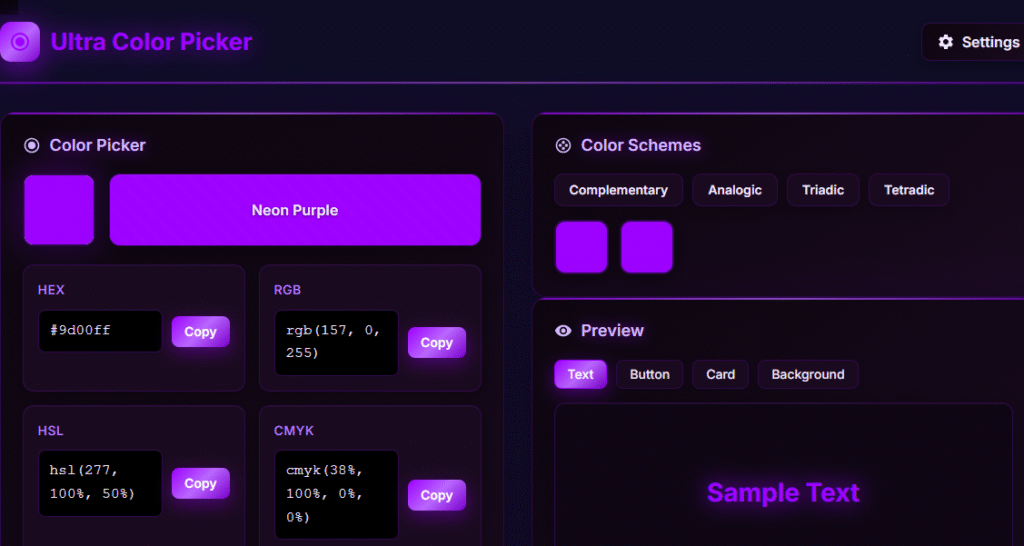
Color Picker Tool – Pick, adjust, and convert colors with HEX, RGB, HSL, and CMYK formats. Includes gradient generator, palette creator, and live preview for designers and developers.
Color Picker
Color History
Color Schemes
Preview
Contrast Checker
Color Blindness Simulator
Export/Import
What is Ultra Color Picker?
Ultra Color Picker is a powerful online color selection and design tool that helps you create, explore, and manage colors with ease. Whether you’re a web designer, graphic designer, developer, marketer, or content creator, this tool provides accurate color values, professional color schemes, contrast analysis, and accessibility testing to help you choose the perfect colors for your projects.
How to Use
Step 1
Choose a color using the color picker.
Step 2
View color values in HEX, RGB, HSL, or CMYK format.
Step 3
Copy the desired color code.
Step 4
Explore matching color schemes.
Step 5
Check accessibility and contrast ratios.
Step 6
Save, export, or share your color palette.
Key Features of Color Picker
🎨 Advanced Color Picker
Select colors visually and instantly view HEX, RGB, HSL, and CMYK values.
📋 One-Click Copy
Copy color codes in multiple formats with a single click.
🌈 Color Schemes Generator
Generate complementary, analogous, triadic, and tetradic color palettes automatically.
♿ Contrast Checker
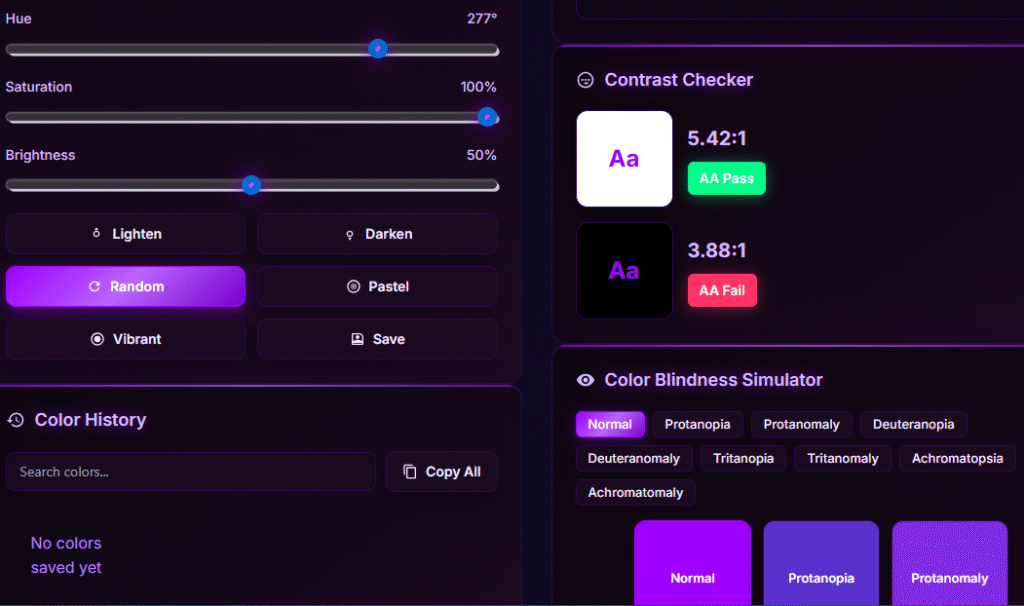
Test color combinations for readability and accessibility compliance.
👁️ Color Blindness Simulator
Preview how colors appear to users with different types of color vision deficiencies.
🕒 Color History
Save and revisit previously selected colors anytime.
✨ Quick Color Tools
Lighten, darken, randomize, create pastel shades, and generate vibrant colors instantly.
📤 Export & Import
Export color palettes as JSON files or images and import saved palettes whenever needed.
Why Use Our Ultra Color Picker?
Our Ultra Color Picker combines color selection, palette generation, accessibility testing, and color management in one easy-to-use tool. It helps designers and developers create visually appealing and accessible designs while saving time during the creative process.
Frequently Asked Questions
Our online color picker tool is designed as a comprehensive suite for designers and developers to select, convert, and verify colors. It functions as a professional web color tool that handles everything from generating HEX, RGB, HSL, and CMYK codes to ensuring your project meets WCAG accessibility standards.
It is incredibly simple! You can use our free HEX-to-RGB converter for web coding, or utilize the RGB-to-HSL converter when you need to make intuitive adjustments to hue and saturation. If you are moving from a print layout to a website, our CMYK-to-HEX converter ensures your brand colors remain consistent across all platforms like WordPress or Shopify.
Yes, accessibility is a core feature. We have integrated a WCAG contrast checker tool and a dedicated accessibility color checker to help you meet Section 508 and W3C requirements. This ensures your text is readable against your background colors, providing a better experience for all users.
Absolutely. Our color blindness simulator online allows you to preview your selected palette through the lens of various vision deficiencies, such as Protanopia or Deuteranopia. This is a vital step for professional developers using tools like Figma or Adobe XD to create inclusive digital products.
Definitely! You can use our free online color palette generator to build cohesive themes. If you are feeling stuck, try the random color generator for a spark of creativity, the pastel color generator for soft, modern aesthetics, or the vibrant color generator to create high-energy designs for social media platforms like Instagram or TikTok.
Yes, it is. Whether you are a graphic designer or a digital marketer, our color scheme generator helps you maintain brand harmony. By providing precise values for HEX, RGB, and CMYK, you can ensure that your brand assets look identical whether they are viewed on a MacBook Pro screen or printed on a physical business card.
While HEX is the standard for CSS, HSL (Hue, Saturation, Lightness) is often preferred by designers because it is much more intuitive to adjust. Our tool allows you to toggle between these formats instantly, making it easier to create hover states or color variations for complex UI elements in React or Tailwind CSS.