
Merge PDF
Online Merge PDF Tool is a fast and secure tool that combines multiple PDF files into one easily. You can use drag-and-drop, see a preview of the pages, and download with one click. It is completely safe and private.
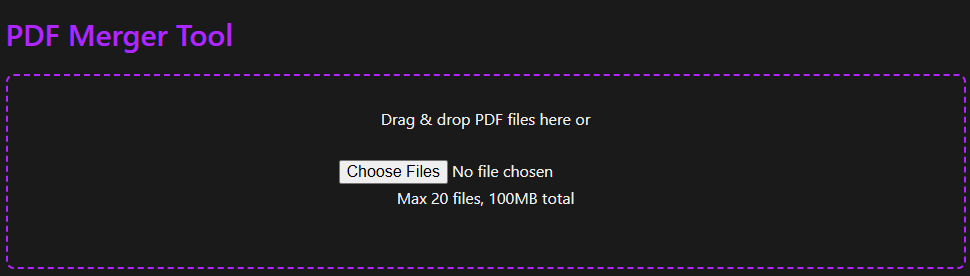
PDF Merger Tool
Drag & drop PDF files here or
Max 20 files, 100MB total
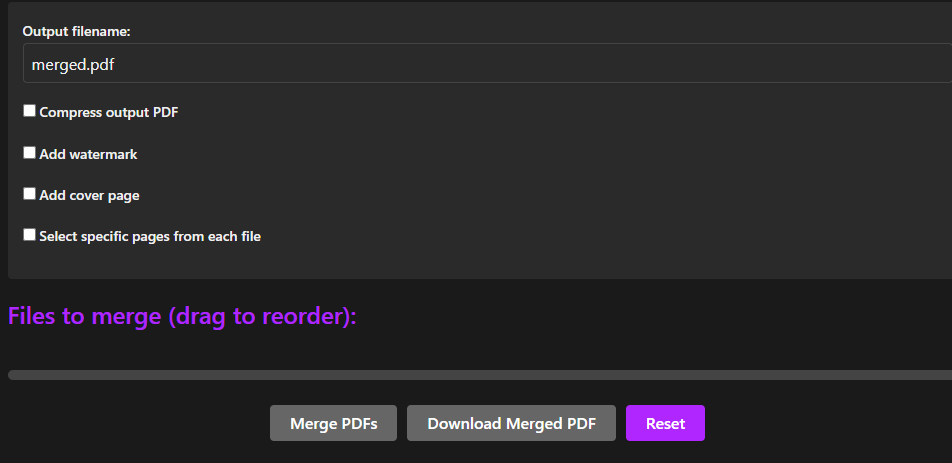
Files to merge (drag to reorder):
Why Choose Our Merge PDF Tool?
Merge PDF Tool provides a simple, fast, and reliable way to combine multiple PDF files into a single document. With features like drag-and-drop uploads, file reordering, page selection, PDF compression, and secure processing, it helps users save time while keeping documents organized. Whether you’re a student, professional, or business user, the tool offers a smooth experience without requiring software installation or registration.
Features of Merge PDF Tool
- Combine Multiple PDF Files
- Drag-and-Drop Upload
- Reorder PDF Files
- PDF Preview Support
- Custom Output Filename
- PDF Compression Option
- Watermark Support
- Cover Page Creation
- Select Specific Pages
- Privacy-Focused Design
How to Use
Upload one or more PDF files.
Arrange files in the desired order.
Select optional settings such as compression, watermark, or cover page.
Choose specific pages if required.
Enter a custom output filename.
Click Merge PDFs.
Download the merged PDF file instantly.
Common Uses
This Merge PDF Tool is useful for:
Students combining assignments and study materials
Teachers creating educational resources
Businesses organizing reports and invoices
HR departments managing employee documents
Freelancers sharing project files
Legal and administrative document management
Anyone needing a single PDF from multiple files
Benefits of Merging PDF Files
Combining PDF files can help:
Keep documents organized
Reduce document clutter
Simplify file sharing
Improve document management
Create professional reports
Save storage space when compression is enabled
Frequently Asked Questions
You can use a free PDF merger to combine multiple PDFs into a single document quickly and easily. Our browser-based tool allows you to join PDF files online without any software installation or hidden costs, making it a budget-friendly choice for everyone from students to business professionals.
Yes! When you combine PDF files using our tool, we ensure that the text, images, and formatting remain crisp and professional. Our secure PDF merger tool is designed to maintain high resolution, so your research papers, contracts, and business proposals look perfect every time.
Absolutely. Unlike basic PDF joiners, our tool offers full control. You can select specific pages from each file to merge only selected pages. This allows you to avoid unnecessary content, which saves time and helps reduce file size for the final output.
You can upload up to 20 files with a maximum total limit of 100 MB. With our drag-and-drop support, you can manage the file list easily, allowing you to combine scanned documents or merge invoices in one go. If the final file is too large for email, simply use the compress output option to optimize it for email delivery.
Your privacy is our top priority. We provide secure & private PDF merging with secure processing and fast browser-based merging. Because there is no permanent file storage and no login required, your confidential documents stay private. It is a secure PDF merger tool trusted by accountants, lawyers, and office workers.
Yes, we offer advanced customization options. You can add a cover page to your document for a professional look, which is perfect for reports and assignments. Additionally, you can add a watermark feature for branding, copyright protection, or to establish a clear business identity.