
Word to PDF Converter
Online Word to PDF Converter is a fast, secure, and free online tool to convert DOCX, DOC, RTF, TXT, MD, HTML, PNG, JPG, and WEBP files to high-quality PDFs. It supports drag-and-drop upload, live preview, page settings, header and footer customization, batch conversion & ZIP download, and requires no installation and is free of charge.
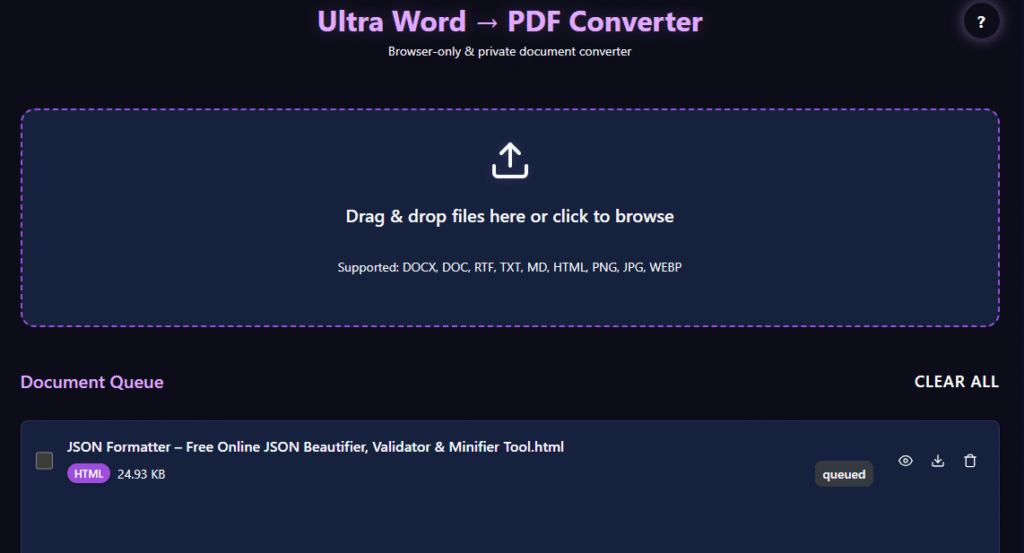
Ultra Word → PDF Converter
Browser-only & private document converter
Drag & drop files here or click to browse
Supported: DOCX, DOC, RTF, TXT, MD, HTML, PNG, JPG, WEBP
Document Queue
No documents added yet
Preview
Select a document to preview
Conversion Settings
Page Settings
Margins
Header & Footer
Font Settings
Batch Actions
Conversion Progress
Help & Supported Formats
How to Use
- Drag and drop files or click to browse
- Select files to convert or merge
- Configure conversion settings
- Click "Convert Selected" or "Convert All"
- Download individual PDFs or as a ZIP file
Supported Formats
- DOCX - Full support with styling, tables, images
- DOC - Basic text extraction (styling may be limited)
- RTF - Rich text formatting support
- TXT - Plain text files
- Markdown (.md) - Full Markdown support
- HTML - Sanitized HTML with basic styling
- PNG/JPEG/WebP - Images converted to PDF pages
- ODT - Best effort support (may fall back to plain text)
Download Options
- PDF - Convert to PDF format
- TXT - Extract text content
- HTML - Save as HTML file
- Original - Download original file
- PNG/JPG/WebP - Convert images to different formats
Privacy
All processing happens in your browser. Files never leave your device.
Troubleshooting
If you encounter issues with complex documents, try converting to plain text first or use simpler formatting.
Why Use Our Word to PDF Converter?
One of the most popular file formats to share documents is PDF because it keeps the formatting consistent across different devices and operating systems. Our converter produces trustworthy PDFs that maintain the original content structure and appearance.
How to Use Word to PDF Converter Tool
Step 1
Drag and drop files in the upload area.
Step 2
Select the desired conversion settings.
Step 3
Customize page size, margins, headers, or footers if needed.
Step 4
Click "Convert Selected" or "Convert All."
Step 5
Download your PDF instantly.
Step 6
For multiple files, you can also merge them into a single PDF or download them together as a ZIP archive.
Features of Word to PDF Converter Tool
Batch Conversion
Convert multiple documents into PDF format at the same time, saving valuable time and effort.
Merge Documents
Combine several files in a single PDF document for easier sharing and organization.
Page Customization
Choose from different page sizes and layouts.
Header and Footer Support
Add custom headers and footers to your PDF documents.
Font Controls
Customize font family and font size to improve readability and document presentation.
High-Quality Image Conversion
Convert images to PDF while maintaining excellent visual quality and clarity.
Key Benefits of Word to PDF
- 100% browser-based processing
- No file uploads required
- Fast PDF generation
- Support for multiple file formats
- Batch conversion support
- Merge multiple documents into a single PDF
- Custom page settings and layouts
- Secure and private document processing
Frequently Asked Questions
This word-to-PDF converter is an advanced online document converter designed to transform different file formats into professional PDF files. Supported formats include DOCX, DOC, RTF, TXT, MD, HTML, PNG, JPG, and WebP. Whether you need a Markdown-to-PDF converter or an HTML-to-PDF converter, our tool handles it all seamlessly.
Yes, it is fully cross-platform. Our browser-based DOCX to PDF converter tool works perfectly on Windows, macOS, Linux, and even mobile devices. As long as you have a modern web browser like Google Chrome, Mozilla Firefox, or Apple Safari, you can convert documents to PDF from anywhere.
Yes, you can! Our online batch PDF converter allows you to select and convert multiple Word files to PDF online simultaneously. This feature is perfect for professionals who need to convert files to PDF instantly without the hassle of processing each document one by one.
There are no limits! We provide the best free online Word-to-PDF converter experience by offering unlimited daily conversions. You can convert DOCX to PDF for free as often as you need, making it an essential tool for students, teachers, and remote workers.
Yes, you can. In addition to being a powerful DOC-to-PDF converter, our platform functions as a high-quality image-to-PDF converter. You can easily convert images and documents to PDF online, including high-resolution JPG, PNG, and modern WebP formats, ensuring your visual content looks professional in a PDF layout.