CSS Code Generator
Free CSS Code Generator – Create shadows, gradients, animations, borders, text effects, backgrounds, filters, shapes, flexbox & grid with live preview. Copy ready-to-use CSS instantly for your website.
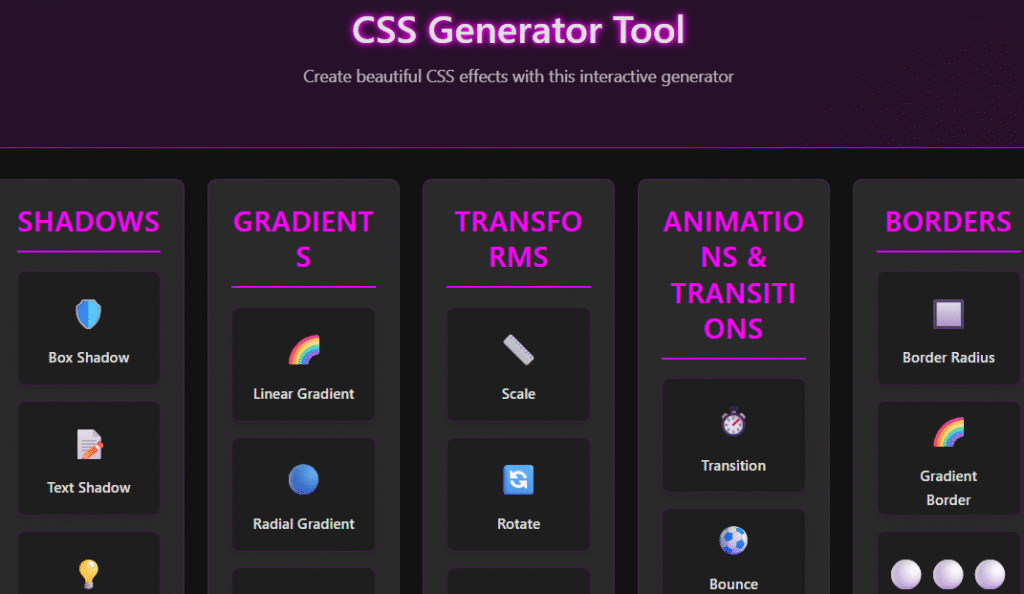
CSS Generator Tool
Create beautiful CSS effects with this interactive generator
Feature Title
Preview
Controls
CSS Generator Tool – Free Online CSS Code Generator for Effects, Animations & Layouts
Building beautiful websites should be a fun and creative process. If you are tired of writing complex syntax from scratch, our css generator tool is here to simplify your workflow. This intuitive platform helps you craft stunning visual styles in seconds.
Whether you need a reliable online css generator for responsive layouts or a quick css code generator for smooth animations, we have you covered. Our free css generator allows you to experiment with modern design trends without needing deep technical expertise. You can focus on your vision while we handle the heavy lifting of writing clean, efficient code.
Key Takeaways
- Save time by automating repetitive styling tasks for your web projects.
- Create complex animations and layouts without writing manual code.
- Access a user-friendly interface designed for both beginners and pros.
- Ensure your website remains lightweight with clean, optimized output.
- Experiment with modern design effects instantly to see live previews.
Why You Should Use a Professional CSS Generator
The benefits of using a professional CSS generator extend beyond just saving time. By leveraging such a tool, developers can create complex CSS effects, animations, and layouts with ease, ensuring consistency across different browsers and devices.
A professional CSS generator offers a visual interface to design and generate CSS code, making it easier to achieve the desired design without delving into intricate CSS syntax. This not only accelerates the development process but also reduces the likelihood of errors.
The Benefits of Visual CSS Design
Visual CSS design allows developers to see the changes they make in real-time, making it easier to experiment with different styles and layouts. This approach enables a more intuitive design process, as developers can directly observe how their CSS code affects the overall design.
Key benefits of visual CSS design include:
- Real-time preview of design changes
- Easier experimentation with different styles
- Improved accuracy in achieving the desired design
Saving Time on Complex Syntax
One of the significant advantages of using a CSS generator is the ability to save time on complex syntax. By automating the generation of CSS code for effects, animations, and layouts, developers can focus on other critical aspects of their projects.
| Task | Manual CSS Writing | Using a CSS Generator |
|---|---|---|
| Creating CSS Gradients | Time-consuming and prone to errors | Quick and accurate with visual feedback |
| Designing Animations | Requires in-depth knowledge of CSS animation properties | Simplified through a user-friendly interface |
| Building Responsive Layouts | Can be challenging, especially for complex layouts | Easier with visual tools for Flexbox and Grid |
Ensuring Cross-Browser Compatibility
A professional CSS generator ensures that the generated CSS code is compatible across different browsers, reducing the need for manual adjustments and testing. This compatibility is crucial for providing a consistent user experience across various platforms.
By using a CSS generator, developers can create CSS online and generate CSS code free from compatibility issues, allowing them to focus on other aspects of web development.
Mastering Layouts with Flexbox and Grid Generators
The CSS Generator is an indispensable tool for web developers looking to master layouts using Flexbox and Grid. It simplifies the process of creating complex and responsive layouts by providing a visual interface to design and generate the necessary CSS code.
Building Responsive Flexbox Containers
Flexbox is a powerful layout mode that allows for the creation of flexible and responsive containers. With a CSS Flexbox Generator, developers can easily define the layout properties of a container, such as flex direction, justification, and alignment, without delving into complex CSS syntax.
For instance, to create a responsive Flexbox container, you can use the CSS Generator to set the `flex-direction` to `row` or `column` based on your layout needs. The generator will produce the corresponding CSS code, which can be directly integrated into your stylesheet.
“Flexbox is particularly useful for component-level layout, allowing developers to create flexible and responsive UI components.” –
CSS-Tricks
Simplifying Complex CSS Grid Structures
CSS Grid is another powerful layout system that allows for the creation of two-dimensional grids. A CSS Grid Generator simplifies the process of defining grid structures by providing a visual interface to create and manage grid rows, columns, and gaps.
Using a CSS Grid Generator, developers can easily create complex grid layouts by specifying the number of rows and columns, grid gap, and other properties. The generator produces the CSS code required to implement the grid layout, saving time and reducing the complexity associated with manual coding.
Visualizing Alignment and Spacing
One of the key benefits of using a CSS Generator for Flexbox and Grid is the ability to visualize alignment and spacing. The generator provides a real-time preview of how the layout will look based on the defined properties, allowing developers to fine-tune the alignment and spacing of elements within the layout.
The following table illustrates the key properties that can be controlled using a CSS Flexbox or Grid Generator:
| Property | Description | Flexbox/Grid |
|---|---|---|
| Flex Direction | Defines the direction of the flex items | Flexbox |
| Justify Content | Aligns flex items along the main axis | Flexbox |
| Grid Template Columns | Defines the number and size of grid columns | Grid |
| Grid Gap | Specifies the gap between grid cells | Grid |
By utilizing a CSS Generator for Flexbox and Grid, developers can streamline the layout creation process, reduce the complexity associated with manual coding, and ensure cross-browser compatibility.
Creating Visual Flair with Gradient and Shadow Tools
With the CSS Generator, you can easily create modern CSS gradients, perfect box shadows, and custom border styles. These tools are designed to enhance the visual appeal of your web projects without requiring extensive CSS knowledge.
Designing Modern CSS Gradients
Modern CSS gradients can add depth and visual interest to your website. The CSS Generator’s gradient generator css tool allows you to select from various gradient types, including linear and radial gradients. You can customize the colors, direction, and other properties to fit your design needs.
For instance, you can create a linear gradient background with the following CSS code generated by the tool:
.linear-gradient { background-image: linear-gradient(to right, #ff69b4, #ffe6f2);
}
This code snippet demonstrates how to create a simple linear gradient from pink to a lighter shade of pink.
Perfecting Box Shadows for Depth
Box shadows are a powerful way to add depth to your UI elements. The CSS Generator’s box shadow generator enables you to experiment with different shadow properties, such as offset, blur radius, and color. You can achieve a variety of effects, from subtle depth cues to dramatic shadow effects.
For example, the following CSS code generates a box shadow with a moderate offset and blur:
.box-shadow { box-shadow: 0 4px 8px rgba(0, 0, 0, 0.2);
}
Implementing Custom Border Styles
Custom border styles can further enhance the visual appeal of your website. The CSS Generator allows you to create unique border styles, including dashed, dotted, and solid borders with various widths and colors. You can also generate CSS code for more complex border effects, such as double borders or borders with rounded corners using the css border generator.
By utilizing these tools, you can significantly enhance the aesthetic of your web projects. Whether you’re designing a simple blog or a complex web application, the CSS Generators’ gradient, shadow, and border tools provide the flexibility and ease of use needed to achieve professional-looking results.
Streamlining Animations and Hover Effects
Streamlining animations and hover effects is now easier than ever with the help of a CSS Generator. Animations and hover effects play a significant role in enhancing the user experience on a website, making interactions more engaging and intuitive.
Smooth CSS Keyframe Animations
Generating smooth CSS keyframe animations is crucial for creating a seamless user experience. With a CSS animation creator, you can define complex animations without delving into intricate code. This tool allows you to specify keyframes, timing, and iteration counts, making it easier to achieve the desired effect.
For instance, you can create animations that draw attention to specific elements on your webpage or enhance the overall aesthetic appeal. By using an online tool to generate CSS animations, you can experiment with different animation styles and properties until you find the perfect fit for your site.
Crafting Interactive Hover Effects
Crafting interactive hover effects is another way to enhance user engagement. A CSS hover effects generator simplifies the process by providing a visual interface to design and customize hover effects. You can adjust properties such as color, scale, and opacity to create visually appealing effects.
These effects can be used to provide feedback to users when they interact with elements like buttons or links, making your website feel more responsive and interactive.
Adding Transitions for Better User Experience
Adding transitions is essential for a smooth user experience. Transitions help in creating a fluid interaction by gradually changing the state of an element over a specified duration. This can be particularly useful when combined with hover effects or animations.
By using a CSS Generator to create transitions, you can ensure that the changes are smooth and consistent across different browsers and devices.
| Feature | Description | Benefit |
|---|---|---|
| Smooth Animations | Generated using CSS keyframe animations | Enhances user engagement and experience |
| Interactive Hover Effects | Customized with CSS hover effects generator | Provides visual feedback and improves interactivity |
| Transitions | Created for smooth state changes | Ensures a fluid and responsive user interface |
Best Practices for Integrating Generated CSS into Your Workflow
To get the most out of your CSS generator tool, it’s essential to follow best practices for integration. A visual css generator for beginners can simplify the process, but understanding how to incorporate the generated code into your project is crucial.
When working with generated CSS, one of the first considerations is how to organize your stylesheets effectively. A well-organized stylesheet is the backbone of any maintainable web project.
Organizing Your Stylesheets
To keep your project tidy, consider separating generated CSS from your custom styles. You can create a dedicated file or folder for generated code, making it easier to manage and update. For instance, you might have a generated folder where all the CSS generated by your tool is stored.
“A well-organized stylesheet is not just about aesthetics; it’s about maintainability and scalability.” This approach allows you to easily locate and modify generated styles without affecting your custom CSS.
Maintaining Clean and Readable Code
Maintaining clean and readable code is vital for collaboration and future updates. Ensure that the generated CSS is formatted consistently with your project’s coding standards. You can use tools to minify and compress CSS for production, but during development, readability should be a priority.
For example, using a best free css generator tool online can help you create CSS effects without coding, but it’s essential to review the generated code for any unnecessary or redundant styles.
Testing Generated Styles Across Devices
Testing is a critical step in ensuring that generated styles work as intended across different devices and browsers. Use a variety of testing tools and techniques to verify that your CSS is compatible and responsive.
By following these best practices, you can effectively integrate generated CSS into your workflow, ensuring that your projects are both visually appealing and maintainable. Whether you’re a beginner using a visual css generator for beginners or an experienced developer, these tips will help you make the most of your CSS generator tool.
How to Customize and Optimize Your CSS Code
Once you’ve generated your CSS code, the next step is to tailor it to your project’s specific needs. Customization and optimization are crucial for ensuring that your website performs well and provides a good user experience.
Customizing your CSS code involves making adjustments to the generated code to fit your project’s requirements. This can include minifying the code, overriding default settings, and using CSS variables for consistency.
Minifying CSS for Faster Load Times
Minifying your CSS code is an essential step in optimizing your website’s performance. By removing unnecessary characters and whitespace, you can significantly reduce the file size of your CSS files. This results in faster load times and a better user experience. According to “CSS-Tricks”, minifying CSS can reduce file sizes by up to 50%.
To minify your CSS, you can use online tools or plugins that are available for various development environments. For instance, tools like CSSNano or CleanCSS can automatically minify your CSS code.
Overriding Default Generator Settings
While CSS generators provide a solid foundation, you may need to override some default settings to match your project’s requirements. This could involve adjusting the generated CSS to fit your brand’s specific design guidelines or modifying the layout to be more responsive.
For example, if you’re using a CSS gradient and shadow generator free tool, you might need to tweak the generated gradient or shadow effects to better suit your design. This can be done by directly editing the CSS code or using the generator’s built-in customization options.
Using CSS Variables for Global Consistency
CSS variables are a powerful tool for maintaining consistency across your website. By defining variables for colors, fonts, and other design elements, you can ensure that your website has a cohesive look and feel.
“CSS variables make it easy to maintain a consistent design across a website, and they simplify the process of making global changes.” –
MDN Web Docs
To use CSS variables effectively, define them at the root level of your stylesheet and then reference them throughout your CSS code. This approach makes it easy to update your website’s design by changing the variable values in one place.
By following these tips, you can customize and optimize your CSS code to achieve the best possible performance and user experience for your website.
Conclusion
By leveraging a css generator tool, web developers can significantly streamline their workflow, creating visually appealing and responsive designs with ease. The online css generator provides an intuitive interface for crafting complex layouts, animations, and effects, making it an indispensable resource for both novice and experienced developers.
Utilizing a free css generator can help reduce the time spent on writing CSS code from scratch, allowing developers to focus on other critical aspects of their projects. With the ability to generate clean, cross-browser compatible code, these tools are invaluable for ensuring consistency across different platforms.
As a css design tool online, it empowers developers to experiment with various styles and layouts, fostering creativity and innovation. By integrating generated CSS into their workflow and customizing it as needed, developers can achieve professional-grade results efficiently.
Embracing the capabilities of a css generator tool can elevate web development projects, making it a valuable asset in any developer’s toolkit.
FAQ
A css generator tool is a powerful online css generator designed to help developers and designers create css online without having to memorize complex syntax. By using a visual css generator for beginners, you can generate css code free of charge, allowing you to see your design changes in real-time before applying them to platforms like WordPress or Shopify. It streamlines your workflow by providing a way to generate css code instantly online.
Using a free css generator is a massive time-saver, especially when you want to create css effects without coding every single line from scratch. It ensures that your code is clean, optimized, and cross-browser compatible. Whether you are using a css effects generator or a css design tool online, you reduce the risk of syntax errors that often occur when writing manual code for complex properties like transforms or filters.
Layouts can be tricky, but a css layout generator simplifies the process. Specifically, a css flexbox generator helps you align items and distribute space within a container, while a css grid generator allows you to create intricate, two-dimensional layouts with ease. These tools provide a visual interface to manage spacing and alignment, making it much simpler to build responsive structures for modern browsers like Google Chrome and Mozilla Firefox.
Absolutely! A gradient generator css or css gradient maker allows you to blend colors seamlessly for backgrounds and buttons. To add depth, a box shadow generator or css shadow generator online helps you define offsets and blur radii visually. Furthermore, a css gradient and shadow generator free of cost ensures your site looks professional, while a css border generator can help you polish the edges of your UI elements for a sleek, modern finish.
Yes, motion is key to engagement. An online tool to generate css animations or a css animation creator allows you to define keyframes and timing functions visually. You can also use a css animation generator to create smooth entrances, while a css hover effects generator is perfect for crafting interactive buttons and links that respond when a user moves their mouse over them, significantly enhancing the overall user experience.
Once you have used the css code generator to perfect your look, simply copy the generated snippet and paste it into your stylesheet. Professional developers often use these tools to generate css code free and then refine it within editors like Visual Studio Code. For the best results, remember to organize your styles logically and consider minifying the final output to ensure your website loads quickly for your visitors.