
AI Tools for Content Creation: A Complete Guide for Beginners (2026 Edition)
Navigating content creation in 2026 presents a unique challenge: audience expectations for high-quality, well-researched material are higher than ever, yet the sheer volume of content published daily can make it difficult to keep up. Whether you run a personal blog, manage social media for a local business, or produce video content as a freelancer, keeping pace with consistent publishing demands real structure.
This guide is written for beginner and intermediate content creators who want to use AI tools responsibly. Rather than presenting AI as a magic solution that replaces original thought or creates finished projects at the press of a button, this article treats AI as a functional assistant. You will learn what the primary AI tools actually do, where their practical limits lie, how to structure a complete human-led content workflow, and how to avoid common pitfalls that compromise quality and search performance.
By the end of this guide, you will have a clear, realistic framework for selecting the right tools and combining them into an efficient, human-guided publishing process.
🎨 Featured Image Suggestion
Visual Concept: A clean, minimalist workspace scene depicting a modern creator’s desk. On the laptop screen, a text outline is displayed alongside open panels for visual editing and task scheduling. Friendly, subtle status badges indicate “Drafting,” “Reviewing,” and “Scheduling.”
Alt Text: A digital creator reviewing an AI-assisted article outline on a laptop in a modern workspace.
Understanding the Role of AI in Modern Content Creation
Artificial intelligence models process vast datasets to recognize language patterns, generate visual elements, and automate repetitive file-handling tasks. In content marketing, their primary utility lies in handling structured, repetitive work that consumes time without adding direct creative value.
How AI Tools Assist the Creative Process
For most beginners, the most significant obstacle in content creation is getting started—a hurdle often referred to as “blank page syndrome.” AI tools assist early-stage development by providing quick structure and initial concepts:
- Outline Generation: AI can quickly organize a broad topic into logical subheadings, key questions, and content sections.
- Information Summarization: Large language models can synthesize lengthy documentation or help identify core themes across multiple sources.
- First-Draft Formatting: Draft generation tools produce initial text structures that serve as a basic canvas for human editing, rewriting, and factual verification.
Realistic Expectations and Key Benefits
When used as assistants rather than automated publishers, AI tools offer several clear practical advantages for content marketers:
- Process Consistency: Automating structural and administrative tasks helps creators maintain a reliable editorial schedule.
- Structured Research Strategy: AI assistants can analyze user search queries and suggest topic clusters or common user questions before drafting begins.
- Format Adaptation: A single, thoroughly researched article can be systematically adapted into email summaries, short social outlines, or visual slide decks.
Top AI Writing and Copywriting Tools for Beginners
Writing tools are among the most accessible entry points for creators. However, output quality depends entirely on the clarity of your instructions (prompts) and the thoroughness of your post-generation editing.
1. Jasper AI
- What it is: A specialized AI writing platform designed for content teams and marketing copywriters.
- Best for: Formatting long-form blog articles, product descriptions, and structured marketing campaigns.
- Main useful features: Brand voice guidelines, pre-built template workflows, and direct integrations with search optimization platforms.
- Who should use it: Marketers and business owners who publish structured content regularly and need consistent formatting.
- Free option: Paid plans only (offers a limited trial period).
- Important limitations: Output can sound formulaic if prompts lack detail; factual claims require manual verification.
- Beginner-friendliness: Moderate; includes many templates, but mastering customized workflows requires practice.
- Content types created: Blog drafts, email sequences, marketing landing pages, and ad text.
- Practical example: A retail blogger feeds Jasper a brief product list and receives a structured comparison draft containing subheadings, feature callouts, and summary tables ready for manual review.
2. Copy.ai
- What it is: An AI writing platform tailored for short-form marketing text and team workflow automation.
- Best for: Social media captions, ad copy variations, subject lines, and short promotional paragraphs.
- Main useful features: Pre-built copy frameworks (e.g., PAS, AIDA), prompt libraries, and multi-channel campaign generation.
- Who should use it: Social media managers, freelance copywriters, and e-commerce store operators.
- Free option: Free tier available with monthly word limits.
- Important limitations: Less suited for deep technical writing or nuanced long-form essays.
- Beginner-friendliness: High; intuitive interface with straightforward template options.
- Content types created: Instagram captions, LinkedIn updates, email subject lines, and short ad variations.
- Practical example: A local fitness trainer inputs three core tips into Copy.ai to generate five distinct caption variations for Instagram and LinkedIn.
3. Grammarly
- What it is: An AI-powered writing assistant focused on grammar, tone, clarity, and structural polish.
- Best for: Proofreading, sentence restructuring, maintaining tone consistency, and catching typographical errors.
- Main useful features: Real-time grammar checking, tone detection, sentence rephrasing suggestions, and plagiarism detection (on paid plans).
- Who should use it: Every writer, blogger, student, and business professional.
- Free option: Robust free version available; premium features require a subscription.
- Important limitations: Suggestions are based on general statistical rules; occasionally misinterprets creative style or industry jargon.
- Beginner-friendliness: Exceptionally high; integrates directly into web browsers and word processors.
- Content types created: Edits and refines existing text across all formats.
- Practical example: A blogger writes an article draft and uses Grammarly to identify passive phrasing, correct punctuation errors, and smooth out awkward transitions.
4. ChatGPT (OpenAI)
- What it is: A versatile conversational AI model capable of ideation, drafting, text transformation, and code generation.
- Best for: Topic brainstorming, outline generation, audience question research, and draft rephrasing.
- Main useful features: Custom GPT instructions, file uploads for document summary, web search integration, and interactive feedback loops.
- Who should use it: Creators of all skill levels looking for a flexible, general-purpose research and writing assistant.
- Free option: Free access to baseline models (e.g., GPT-4o mini); advanced reasoning and image analysis require a subscription.
- Important limitations: Can present incorrect statements as facts (“hallucinations”); requires precise prompting for high-quality results.
- Beginner-friendliness: High for basic conversation; moderate for advanced custom workflows.
- Content types created: Outlines, topic lists, draft summaries, interview questions, and raw text drafts.
- Practical example: A home gardening blogger asks ChatGPT for ten common questions beginners ask about tomato pruning, using the responses to structure an article outline.
Realistic Limitations of AI Writing Tools
Before relying on AI writing tools, keep these practical operational limits in mind:
- Factual Errors: Language models predict text patterns rather than verify truth. Every statistic, quote, product feature, and date must be verified against primary sources.
- Generic Style: Unedited AI text often relies on repetitive sentence structures, stock phrases, and overly formal transitions.
- Loss of Voice: Without clear human editing, content can lose the specific tone, humor, or personal experience that builds reader trust.
Comparison: AI Writing Tools
Tool | Best For | Free Option | Main Strength | Important Limitation |
Jasper AI | Long-form blog & campaign copy | Paid only (Trial) | Structured templates & brand guidelines | Requires subscription; output needs editing |
Copy.ai | Short-form social & ad text | Yes (Limited words) | Fast generation of short copy variations | Not ideal for detailed, technical long-form content |
Grammarly | Editing, tone, & grammar | Yes (Core features) | Clear real-time style & grammar correction | Can over-correct creative stylistic choices |
ChatGPT | Brainstorming & outline generation | Yes (Standard model) | High flexibility across varied research tasks | Can generate inaccurate or unverified facts |
Leading AI Tools for Visual Content and Graphic Design
Visual elements improve article readability and audience retention. Modern AI design platforms assist creators in generating custom graphics, removing background elements, and resizing assets for multi-platform distribution.
1. Midjourney
- What it is: An advanced text-to-image AI generator accessible via Discord and web interface.
- Best for: Producing highly detailed custom artwork, original conceptual visuals, and stylized editorial illustrations.
- Main useful features: High-resolution image generation, detailed style controls, aspect ratio adjustments, and image variations.
- Who should use it: Designers, digital artists, and bloggers who need unique, highly stylized visual concepts.
- Free option: Paid subscription required.
- Important limitations: Requires text-prompting skills; text rendered inside generated images is often distorted; fine detail like human hands can render unnaturally.
- Beginner-friendliness: Moderate; prompt parameter syntax takes time to learn.
- Content types created: Conceptual visual assets, illustration headers, digital art, and texture backgrounds.
- Practical example: A science fiction blogger generates a custom, atmospheric header image depicting a futuristic library.
2. Canva Magic Studio
- What it is: An integrated suite of AI-powered design utilities inside Canva’s graphic design platform.
- Best for: Quick graphic adjustments, background removals, social banner creation, and template layout edits.
- Main useful features: Magic Switch (instant layout resizing), Magic Eraser, automated text-to-graphic tools, and brand Kit integration.
- Who should use it: Beginners, small business managers, and social media creators needing fast visual assets.
- Free option: Free tier available; advanced Magic Studio utilities require Canva Pro.
- Important limitations: AI image generation resolution is lower than dedicated art platforms; layout suggestions can occasionally clutter text placement.
- Beginner-friendliness: Exceptionally high; drag-and-drop design environment.
- Content types created: Social media banners, infographics, presentation slides, YouTube thumbnails, and eBook layouts.
- Practical example: A food blogger removes an unsightly background from a recipe photo and resizes the finished graphic for Pinterest and Instagram in minutes.
3. Adobe Firefly
- What it is: Adobe’s commercially safe generative AI visual model integrated into Creative Cloud applications and standalone web tools.
- Best for: Generative fill, image expansion, vector graphics generation, and text-effect styling.
- Main useful features: Generative Fill (adding or removing elements via prompt), Generative Expand, and training on licensed stock libraries to lower commercial risk.
- Who should use it: Graphic designers, photo editors, and brand marketers requiring commercially safe image generation.
- Free option: Free tier available with monthly generative credits.
- Important limitations: Advanced generative fill options perform best when integrated with Photoshop or Illustrator.
- Beginner-friendliness: High on the web app; moderate when used inside professional Adobe desktop apps.
- Content types created: Photo edits, expanded image backgrounds, visual vector elements, and text typography designs.
- Practical example: A travel creator expands a vertical photo into a wide horizontal banner format for a blog post header while filling in missing natural scenery seamlessly.
Realistic Limitations of AI Visual Tools
Keep these points in mind when producing visual assets with AI:
- Detail Rendering Issues: Generated photos often contain minor anatomical or structural flaws (e.g., incorrect fingers, misaligned reflections, distorted background objects) that require manual touch-ups.
- Text Artifacts: Rendering crisp, readable typography inside AI-generated images remains inconsistent; adding text manually via graphic design software is usually preferable.
- Licensing and Originality: Always check platform terms regarding commercial usage rights, and avoid using images that imitate specific living artists without permission.
Comparison: AI Image and Design Tools
Tool | Best For | Free Option | Main Strength | Important Limitation |
Midjourney | High-stylization artwork & concepts | Paid only | Industry-leading image detail and atmosphere | Prompt-heavy workflow; lacks simple drag-and-drop |
Canva Magic Studio | Fast social graphics & templates | Yes (Basic access) | All-in-one layout, resizing, and template editing | Lower visual generation fidelity than specialist tools |
Adobe Firefly | Commercially safe edits & fills | Yes (Credit-based) | High commercial safety; seamless photo editing | Performs best when paired with Adobe ecosystem |
Smart AI Assistants for Video and Social Media Production
Video production and social content management require significant time for post-production and scheduling. AI tools in this category focus on automated transcription, text-based video editing, and scheduling optimization.
1. Descript
- What it is: A text-based audio and video editing platform that converts media files into interactive transcripts.
- Best for: Podcast editing, video course creation, filler-word removal, and producing short social media clips.
- Main useful features: Text-based video cutting, automatic “um/uh” removal, studio sound enhancement, and automatic caption generation.
- Who should use it: Podcasters, YouTube educators, online course creators, and video marketers.
- Free option: Free tier available with monthly transcription time limits.
- Important limitations: Automatic transcription can mishear technical terms or heavy accents, requiring manual correction.
- Beginner-friendliness: High; editing video feels like editing a standard text document.
- Content types created: Edited long-form video, audio podcasts, captioned video clips, and short promotional teasers.
- Practical example: An educator uploads an hour-long lecture recording, uses Descript to delete filler words with one click, and extracts three highlight clips for YouTube Shorts.
2. HeyGen
- What it is: An AI video creation tool that generates realistic synthetic video presenters from text scripts.
- Best for: Standardized training modules, localized multi-language announcements, and short video presentations.
- Main useful features: Custom digital avatars, text-to-speech voice synthesis, multi-language translation with lip-syncing, and template layouts.
- Who should use it: Corporate trainers, e-learning creators, and teams producing frequent internal video updates without camera equipment.
- Free option: Free trial available with limited video credits.
- Important limitations: Synthetic avatars may lack full emotional range; not always suitable for personal branding that relies on authentic human connection.
- Beginner-friendliness: High; simply paste a script and select an avatar layout.
- Content types created: Onboarding videos, multi-language product tutorials, slide explainer videos, and short social announcements.
- Practical example: A software company inputs a release notes script into HeyGen to generate a short, professional video update in English and Spanish without re-shooting footage.
3. Buffer
- What it is: A social media management platform featuring integrated AI writing and scheduling utilities.
- Best for: Social content planning, cross-platform scheduling, audience engagement tracking, and text rephrasing.
- Main useful features: Multi-channel post scheduling, audience analytics dashboard, idea board, and AI content rephrasing.
- Who should use it: Solo creators, agency managers, and small business operators balancing multiple social channels.
- Free option: Free plan available for connecting up to three social channels.
- Important limitations: Scheduling automation handles post distribution, but audience comment responses and community engagement still require active human management.
- Beginner-friendliness: High; clean and straightforward user dashboard.
- Content types created: Social media post schedules, platform-specific caption variations, and performance report summaries.
- Practical example: A blogger schedules a month of promotional posts across X, LinkedIn, and Facebook while using Buffer’s AI assistant to rephrase captions for each platform’s audience tone.
Realistic Limitations of Video and Social Media AI Tools
- Authenticity Considerations: Synthetic avatars and automated speech generation save time, but audiences often prefer real human presenters for personal stories, reviews, and vlog content.
- Platform Context: Automated cross-posting without adjusting tone, hashtags, and image formats for specific social platforms often leads to lower audience interaction.
- Transcription Accuracy: Automated captions require manual editing to ensure proper noun spelling, punctuation, and correct timing before publishing.
Comparison: AI Video and Social Media Tools
Tool | Best For | Free Option | Main Strength | Important Limitation |
Descript | Text-based video and podcast editing | Yes (Limited usage) | Edits video files by editing text transcripts | Transcriptions require manual proofreading |
HeyGen | Avatar-led tutorial and training videos | Yes (Trial credits) | Fast video creation without physical cameras | Avatars can feel rigid for intimate brand stories |
Buffer | Social scheduling & platform adaptation | Yes (Up to 3 channels) | Unified post scheduling and caption adaptation | Does not replace active real-time community management |
A Complete AI Content Creation Workflow
To get reliable results from AI tools, combine them into a clear, step-by-step process. The following 10-step workflow puts human editorial control at the center of every stage.
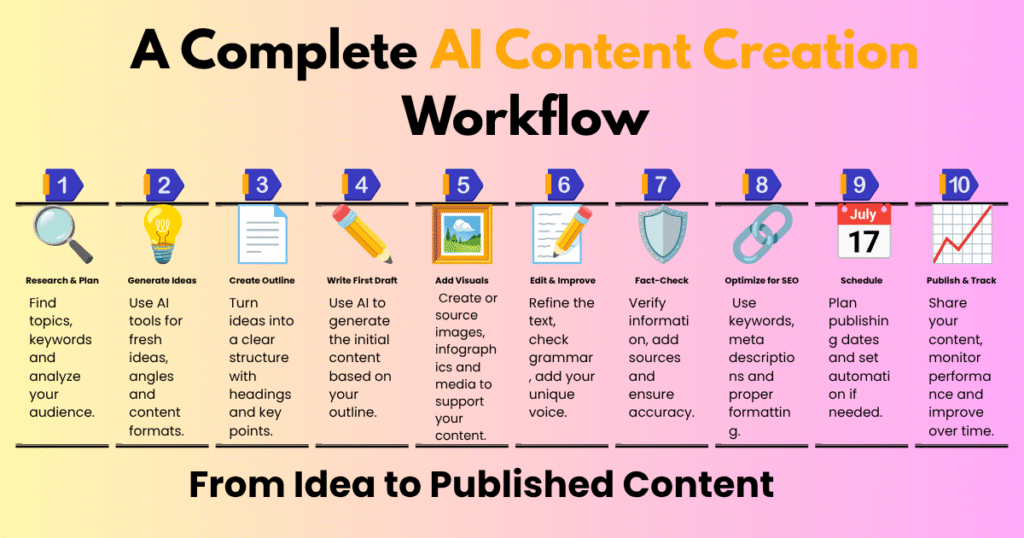
- Choose a Topic: Select a specific topic based on your target audience’s questions, professional experience, or keyword research. Do not rely on AI to choose your primary strategy.
- Research the Subject: Gather primary data, trusted references, and user questions using search engines and academic sources. Use AI assistants (such as ChatGPT) to organize research notes into clear topic categories.
- Generate a Structured Outline: Prompt an AI writing tool to construct an initial article framework based on your research points. Review, edit, and reorganize the outline subheadings manually.
- Create the First Draft: Use AI to draft individual sections under your supervision. Work section-by-section rather than asking for an entire article in a single prompt to maintain focus and quality.
- Verify Facts and Sources: Read through the generated draft carefully. Check every statistic, technical statement, date, product claim, and quote against reliable external sources. Remove unverified claims immediately.
- Edit for Tone, Clarity, and Flow: Rephrase generic or repetitive sentences. Insert personal experience, practical examples, and your brand’s unique voice. Use tools like Grammarly to catch typos and structural issues.
- Create Supporting Visuals: Use Canva, Adobe Firefly, or Midjourney to create complementary visual elements (e.g., header graphics, visual charts, or infographics). Ensure colors and typography align with your brand standards.
- Prepare Social Media Content: Adapt key insights from your completed article into short summaries, social media posts, or video scripts using tools like Copy.ai or Buffer.
- Perform Final Editorial Review: Conduct a final pass of the complete piece—checking formatting, link functionality, visual alignment, and overall readability.
- Publish and Monitor Performance: Publish the final article and track reader engagement, comments, and analytics over time to guide future topics.
Step-by-Step Example: Creating One Blog Article
Here is how a creator can execute this workflow in practice for a hypothetical blog post titled: “Beginner’s Guide to Home Compost Systems.”
- Stage 1: Topic & Research
The creator identifies that readers frequently ask about starting compost bins in small apartments. They ask an AI tool: “What are the 5 most common mistakes beginners make with apartment composting?” The creator cross-references the returned list with agricultural extension guides. - Stage 2: Outline
Using the verified research points, the creator prompts an AI tool to format a 5-heading outline covering setup, materials, moisture control, odor prevention, and troubleshooting. The creator manually adds a section on local municipal bin rules. - Stage 3: Drafting
The creator drafts the article section by section. For the moisture control section, the creator uses AI to write an initial draft, then adds personal experience regarding how household humidity affects the process. - Stage 4: Fact-Checking & Editing
The AI draft suggests that citrus peels take three days to break down. Knowing this is inaccurate, the creator corrects the timeframe to several weeks based on verified composting guidelines. Generic transitional phrases are replaced with direct, conversational language. - Stage 5: Visual Creation
Using Canva Magic Studio, the creator designs an infographic graphic titled “Compost Green vs. Brown Materials Ratio.” The creator double-checks that all text elements on the graphic are readable and accurately aligned. - Stage 6: Social Adaptation
The creator pastes the article summary into Copy.ai to generate three bulleted points for a LinkedIn post and a brief tip for an Instagram caption, pairing each post with the infographic asset. - Stage 7: Final Review
The creator reads the complete article aloud to verify tone, confirms all outbound links open correctly, verifies image alt-text, and hits publish.
Which Tool Should You Choose? A Beginner Decision Guide
With dozens of applications available, selecting the right software depends on your immediate publishing goals. Use this decision guide to build a simple, cost-effective toolkit:
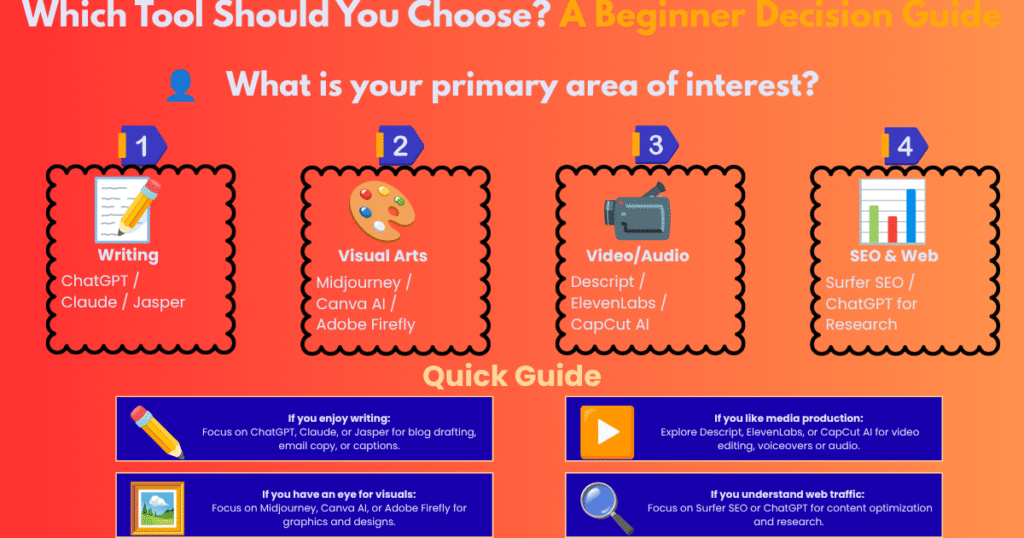
- If your main goal is topic research and initial drafting:
Recommendation: Start with a flexible general-purpose tool like ChatGPT or Claude.
Why: These platforms allow you to brainstorm ideas, create outlines, and test different writing styles within a single chat window at minimal cost. - If your main goal is improving existing text clarity and grammar:
Recommendation: Install Grammarly.
Why: It runs quietly alongside your web browser or word processor, providing real-time corrections without changing your editorial workflow. - If your main goal is generating blog images and social media graphics quickly:
Recommendation: Choose Canva (Magic Studio).
Why: It combines AI assistance with pre-built, editable graphic templates, reducing the technical skill required to produce polished visuals. - If your main goal is editing video lectures, podcasts, or social reels:
Recommendation: Use Descript.
Why: Editing video via text transcription saves significant time compared to traditional timeline editing software. - If your main goal is organizing social media publishing schedules:
Recommendation: Use Buffer.
Why: It simplifies post scheduling across multiple accounts while providing AI-assisted caption adjustments for each network.
Common Mistakes When Using AI for Content Creation
Avoiding these frequent mistakes will preserve content quality, protect search performance, and help build audience trust:
- Publishing Unedited AI Output: Unprocessed text often sounds repetitive, lacks distinct stylistic personality, and can damage your site’s reputation for quality.
- Skipping Factual Verification: AI models frequently state incorrect details with high confidence. Publish data, quotes, or historical facts only after confirming them with trusted sources.
- Ignoring Brand Voice and Tone: Relying entirely on default prompts leads to generic messaging identical to hundreds of other websites in your niche.
- Over-Relying on Synthetic Images: Replacing all visual elements with AI-generated graphics can make a website feel artificial. Mix custom visual elements with real photos where possible.
- Focusing on Quantity Over Value: Publishing dozens of low-quality, AI-generated articles daily dilutes site authority and frustrates readers searching for clear, practical answers.
- Ignoring Copyright and Attribution: Always verify image licensing terms and give credit to primary data sources, researchers, or original creators when using their findings.
- Neglecting Reader Intent: Drafting content purely around keyword density rather than clearly solving a reader’s specific problem results in high bounce rates and low engagement.
The “Human-in-the-Loop” Strategy
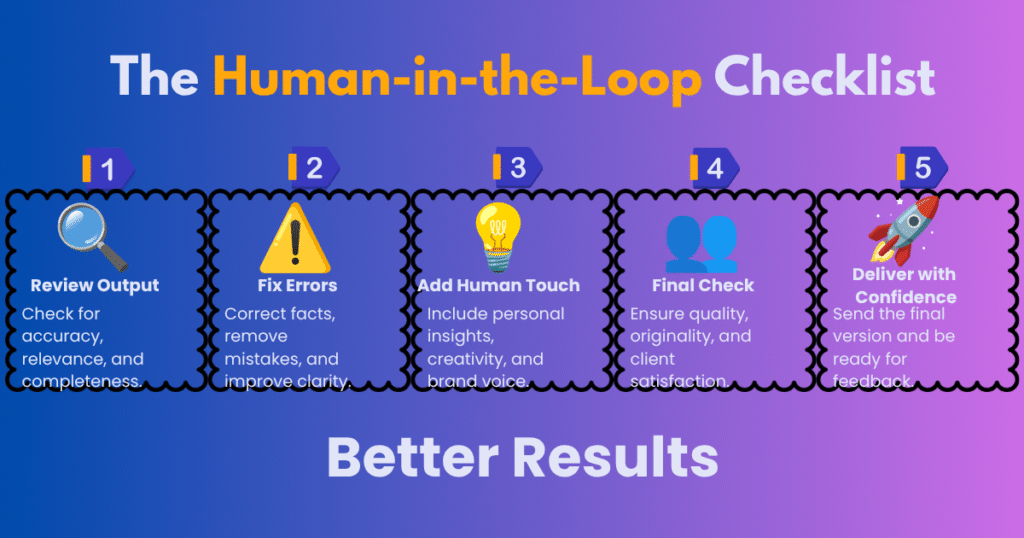
A Human-in-the-Loop (HITL) framework ensures that technology accelerates production without taking control of editorial decisions. Under this model, AI handles raw background work, while human judgment governs final publishing choices.
What Humans Must Check Before Publishing
Before hitting publish on any AI-assisted project, review this verification list:
- Factual Accuracy: Verify every statistic, historical reference, and product specification against reliable secondary or primary documentation.
- Tone and Authenticity: Remove overly technical jargon, repetitive transitional phrases, and forced marketing adjectives. Ensure the text reflects how a knowledgeable person speaks.
- Original Insights: Introduce real-world examples, personal observations, case studies, or expert commentary that software cannot duplicate.
- Structural Logic: Ensure sections flow naturally from one point to the next, with clear subheadings that guide the reader logically through the subject.
- Visual Clarity: Check that graphics, charts, and header images render cleanly without visual distortions or unreadable text elements.
- Copyright and Ethics: Confirm that visual assets are clear for publication and that external data sources are credited appropriately.
Ethical Considerations and Transparency
Maintaining high ethical standards with AI tools protects reader trust and supports long-term brand credibility.
- Transparency and Disclosure: If an article or visual asset relies heavily on AI generation, providing a simple, clear disclosure statement (e.g., “This article was prepared with AI-assisted research and reviewed thoroughly by our editorial team”) sets clear expectations with your audience.
- Originality and Value: Aim to provide genuine informational value rather than summarizing existing top-ranking search pages without adding new perspective or context.
- Data Privacy: Avoid uploading sensitive personal data, proprietary business files, or confidential client records into public AI models, as inputs may be retained for future model training unless opted out.
Frequently Asked Questions (FAQ)
Can AI tools write a complete, ready-to-publish blog post automatically?
While AI tools can generate long text drafts quickly, they rarely produce a final piece ready for publication without human intervention. Drafts typically contain generic language, repetitive structures, and occasional factual inaccuracies that require manual editing and verification.
Is AI-generated content safe to publish on a blog or website?
Yes, provided the final published work is accurate, original, and helpful to human readers. Search platforms focus on content quality, helpfulness, and user satisfaction rather than how the draft was initially produced. However, publishing mass-produced, unverified text can result in search ranking penalties.
Which AI tool should a complete beginner start with first?
Starting with a general-purpose conversational tool like ChatGPT or Claude alongside a design suite like Canva provides the most balanced entry point. This combination allows you to experiment with ideation, drafting, and simple graphic creation without managing complex software setups.
Are free plans sufficient for beginner content creators?
Yes. Free tiers for tools like ChatGPT, Canva, Grammarly, and Buffer offer robust functionality for creators publishing a few pieces of content each month. As your publishing volume increases, upgrading to paid plans unlocks higher word limits, brand asset storage, and advanced image generation options.
How can I make AI-assisted writing sound more natural and human?
Edit the draft by inserting your own experiences, rephrasing formal language, shortening overly long sentences, and deleting repetitive buzzwords. Reading the draft aloud is an effective way to identify awkward phrasing that needs adjustment.
Can I legally use AI-generated images on my commercial website?
In most cases, image generation platforms grant commercial usage rights under their paid terms of service. However, licensing terms vary between platforms. Always review the terms of service for your specific tool, and avoid generating images that incorporate trademarked logos or protected brand assets.
What are the biggest risks of relying too heavily on AI tools?
The primary risks include publishing factual errors, losing your brand’s unique tone, producing generic content identical to competitors, and alienating readers who value authentic human perspective and practical experience.
Final Thoughts: Start Small and Build Your Workflow
Mastering AI for content creation is not about adopting every application on the market at once. Attempting to use multiple new tools simultaneously often leads to fragmented workflows and unnecessary complexity.
Instead, start small:
- Choose one writing or research assistant (such as ChatGPT) to help with brainstorming and outlines.
- Pair it with one visual editing tool (such as Canva) for header images and simple social graphics.
- Establish a consistent Human-in-the-Loop review habit where you review every line of text for accuracy, clarity, and original value.
As you become comfortable managing these tools, gradually expand your toolkit to meet specific production needs. By placing technology in the role of an assistant while retaining full editorial control, you can produce consistent, high-quality content that informs, engages, and builds long-term trust with your audience.