Free AI Tools Actually Worth Your Time: Complete Guide for Beginners
I’ll be honest—most “best AI tools” roundups read like they were assembled by someone who’s never actually opened half the apps they’re listing. So, this isn’t going to be that. These are tools I’d genuinely recommend to a friend if they messaged me asking where to start.
Quick context on how I’m splitting this up: writing, images, video, and the boring-but-necessary stuff (scheduling, organizing, not losing your ideas in a Notes app graveyard). Skip to whichever section actually matches your problem.
Okay, but why does any of this matter?
Look, using AI tools day to day stopped being a novelty a while back. At this point, it’s just… part of how the work gets done, the same way nobody thinks twice about using spellcheck. The upside isn’t that it’s flashy — it’s that it buys back hours you’d otherwise spend on stuff that doesn’t need your full attention, so you can put that attention toward the parts that actually do.

And the entry cost is basically nothing now. Doesn’t matter if you’re writing, editing video, or just trying to keep five social accounts from going quiet—there’s a free tool somewhere built for your exact headache. The people staying ahead right now aren’t smarter, necessarily. They just stopped doing things manually that a tool could handle in a tenth of the time.
The part nobody tells you about “free”
Free tiers are real, and they’re genuinely useful—I don’t want to undersell that. But go in with realistic expectations. Most of these run on a freemium setup, which usually shows up as a daily cap on generations, a watermark slapped on your export, or things just running slower whenever traffic spikes.
Before you build a whole workflow around a free tool, actually go read the terms—I know, nobody wants to, but it saves you grief later. Some platforms cap you at a handful of generations a day. Others technically don’t let you use the output commercially, which is a problem you really don’t want to discover after you’ve already sent something to a client.
Writing tools that don’t feel like a chore
Even people who write for a living stall out sometimes. Doesn’t matter how many years you’ve been doing it—the blank page doesn’t care. These three cover most of the gap from “nothing” to “publishable.”
ChatGPT, for when you have literally nothing yet
This is the one I reach for when I don’t even have a topic figured out, just a vague itch. Give it something loose, and it’ll turn it into an outline, or a rough first draft you can react to—and reacting to bad text is somehow always easier than staring at a blank page.
Where it earns its keep is the back and forth. Tell it what’s wrong, be specific, and it actually adjusts instead of just rephrasing the same thing. It won’t sound like you right out of the gate—nothing does—but for cranking out volume without burning out, it’s genuinely useful.
Claude, when the writing actually needs to hold up
For longer pieces—the kind where a flat, robotic tone would be obvious and kind of embarrassing—Claude’s usually my pick. It’s better at holding onto context across a long document, which matters if you’re writing something dense or building an argument that needs to connect across several sections instead of just existing as disconnected paragraphs.
People notice the tone difference pretty quickly once they’ve used a few different models side by side. It’s not magic; it just tends not to sound like a template filled in with your topic.
Grammarly, for catching what your own eyes stop seeing
By the time you’ve read your own draft for the tenth time , you’re not really reading it anymore you’re pattern matching against what you expect it to say. That’s exactly when Grammarly earns its spot , catching the passive voice , the clunky phrasing , the tone drift you’d never catch on
your own.
If you’re trying to keep a consistent voice across multiple writers or a whole brand, this is honestly the tool doing the enforcing, quietly, in the background. It’s the last gate before something’s actually ready to go out.
Image tools that don’t scream “made by AI”
You genuinely don’t need design training anymore to produce something that looks intentional. A few free tools have closed most of the gap that used to require either real skill or a freelancer invoice.
Microsoft Designer slots into a normal workflow with almost no friction—social posts, flyers, that kind of everyday visual need. It suggests layouts and colors based on what you’re making, so even with zero design background, the output doesn’t read as amateur.
Adobe Firefly is worth considering when you need AI-generated visuals for creative projects, but you should still review the current licensing and usage terms before using generated content commercially.
Video, without a crew or a budget
You can make a video that looks like actual effort went into it without renting equipment or hiring anyone. Three tools cover most of what independent creators actually need here.
CapCut’s auto-captioning alone justifies the download—it’s a real difference-maker for accessibility and for keeping people from scrolling past your video in the first three seconds. Anyone doing fast-turnaround social video should already have this.
Runway Gen-2 is where things get more interesting—turning a text prompt into an actual visual sequence, or slapping a stylistic filter on footage in a way that used to take real editing skill. It’s the tool for pushing past “competent” into something that actually looks considered.
HeyGen is the move if you’d rather not be on camera at all. Type a script, get a realistic AI avatar delivering it—genuinely handy for tutorials or corporate-style content where clarity matters more than personality.
Keeping it all from turning into chaos
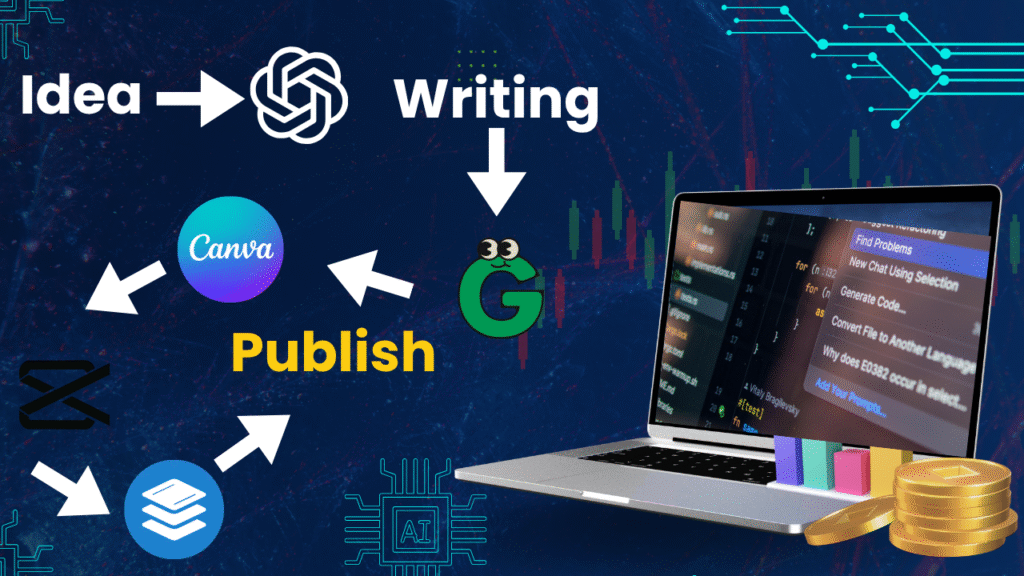
Making the content is only half the job. The other half is not losing track of what you made, where it’s going, and when.
Buffer has gotten smart enough to suggest posting times based on when your audience is actually online, not some generic “best practice” chart from 2019. Plan a few weeks in one sitting instead of scrambling daily.
Notion AI is where half-formed ideas go so they don’t just disappear. It works as a hub for brainstorming, script drafts, and tracking what stage everything’s at—genuinely saves you from losing a good idea because you didn’t write it down in time.
Canva Magic Studio is pure speed—resize something, strip a background, generate a quick asset from a prompt, without opening a heavier design tool for a five-minute job.
How to actually pick, instead of downloading everything
Here’s the trap: grabbing every tool on a list like this instead of figuring out what you specifically need. A toolkit built around hype instead of your actual bottlenecks just turns into five apps you open once and forget about.
Be honest about where your time actually disappears. Is it the writing? The editing? The part where you sit down to schedule a week of posts and it eats your whole afternoon? Pick your top two or three pain points and go find tools for those specifically—not everything at once.
Then swap in one tool at a time. Replace a single manual task, see how it actually feels in practice, and only then add the next one. This keeps you from troubleshooting five new tools simultaneously when something inevitably breaks.
And through all of it, don’t let the tools quietly take over your voice. They’re great at the repetitive stuff—outlines, first drafts, resized graphics, captions. But the final pass, the personal detail, the judgment call on what actually sounds like you—that stays yours. The people getting the most out of this treat it like a fast, tireless assistant. Not a replacement.
Where this actually leaves you
None of this matters if it ends up flattening your voice instead of freeing it up. The creators doing well aren’t the ones with the most tools installed—they’re the ones who found the two or three that genuinely remove their specific bottlenecks, and kept their own judgment in the driver’s seat the whole time.
Pick one thing from this list. Try it this week. See how it actually fits before you add anything else. That’s a better plan than trying to overhaul your whole workflow overnight—and it’s how the habit actually sticks, instead of fizzling out after a week.
Frequently Asked Questions
Because the demand for content hasn’t slowed down and, honestly, never will. Free tools now close a real gap between “what a professional team could produce” and “what one person can realistically get done alone.” Whether that’s outlining faster or knocking out a thumbnail in five minutes, the right tool is a genuine multiplier on your time.
Daily caps, watermarks, slower processing at peak hours—the usual trade-offs. Some tools, like Leonardo or Runway, are pretty generous with resets. But if you’re using this stuff heavily, you’ll hit the ceiling eventually and have to weigh whether paying makes sense.
Claude, generally, especially for longer pieces—it avoids a lot of the repetitive tics other models fall into. Pair it with Grammarly for the final polish—and you end up with something that genuinely reads like a person wrote and edited it.
No, it’s genuinely true now. Microsoft Designer and Adobe Firefly especially have closed a lot of the gap that used to require real design chops or a paid photo subscription. Great for anyone who needs clean, safe-to-use imagery without a budget for it.
CapCut for fast, captioned social clips. Runway Gen-2 if you want more cinematic effects out of basic footage. HeyGen if you don’t want to be on camera but still need something polished.
Start with the organizing layer Notion for planning, Canva for quick assets, Buffer for
scheduling. The whole point is automating the repetitive parts so you spend less time managing
tools and more time actually thinking.
Let it handle the heavy lifting first drafts, outlines, structural stuff but always do a real human pass after. Add the personal detail, the specific phrasing, the judgment call a tool wouldn’t make. The people who get the best results treat AI as an assistant, full stop, not as the final word.