Best AI Tools to Make Money Online: The Complete Beginner’s Guide
AI tools will not automatically deposit money into your bank account, nor will they replace the need to learn a real skill. However, when used as productivity assistants, they can help you draft content faster, design visuals, edit videos, and streamline client work.
If you want to offer digital services as a freelancer, agency worker, or content creator, AI tools can accelerate your workflow. This guide breaks down the best beginner-friendly AI tools, what services you can realistically offer with them, step-by-step project workflows, and the essential human quality control needed to turn AI drafts into valuable deliverables.
1. Which AI Path Should You Choose?
Before picking a tool, align your choice with your existing strengths or interests. AI tools enhance skills; they do not replace them.
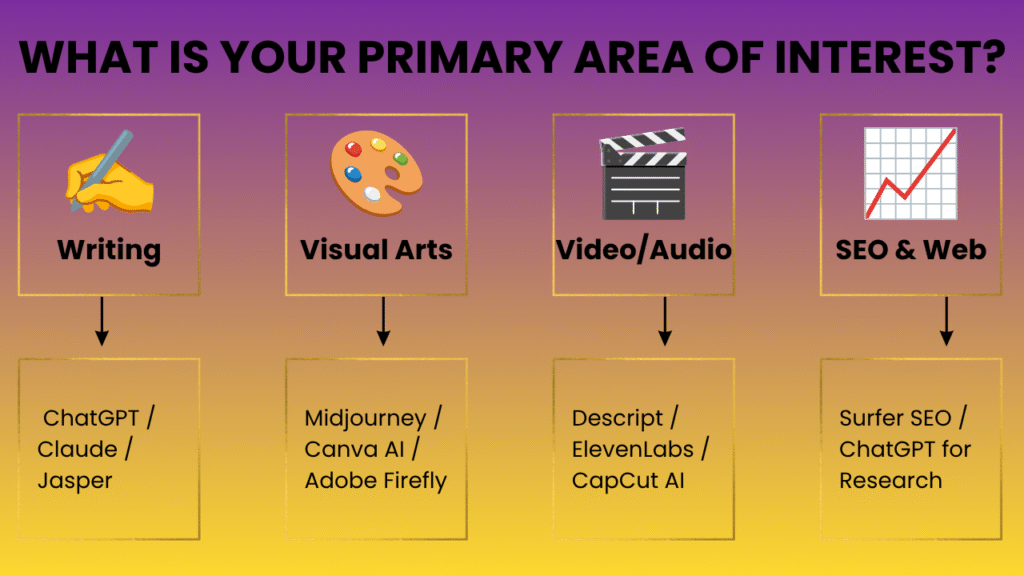
- If you enjoy writing: Focus on ChatGPT, Claude, or Jasper to offer blog drafting, email copy, or social media caption services.
- If you have an eye for visuals: Focus on Midjourney, Canva AI, or Adobe Firefly for graphics, social assets, or promotional materials.
- If you like media production: Explore Descript, ElevenLabs, or CapCut AI for podcast editing, short-form video creation, or voiceovers.
- If you understand web traffic and structure: Focus on Surfer SEO or ChatGPT to offer content optimization, topic research, and outline building.
2. Detailed Tool Breakdown: What You Can Actually Sell
Generative Text & Content Assistants
ChatGPT (OpenAI)
- What it does: Generates text, brainstorms ideas, drafts outlines, and assists with basic research or code scripts based on text prompts.
- Best for: General content creation, email drafting, outlining, and basic customer support responses.
- Skill level: Beginner.
- What a beginner can sell: Article outlines, initial blog post drafts, social media content calendars, email sequences, and basic copywriting support.
- Simple workflow: Brief client intake → Prompting ChatGPT for research/structure → Generating section drafts → Fact-checking, editing, and personalizing tone.
- One realistic usecase: Creating a month’s worth of social media post hooks and outlines for a local gym or boutique business.
- Main limitation: Can confidently generate incorrect facts (hallucinations) and often uses repetitive structural patterns and cliché phrases.
- Who should skip it: Writers looking for immediate, polished end products without needing to edit or verify accuracy.
Claude (Anthropic)
- What it does: Processes long documents, generates nuanced prose, and maintains a natural, conversational writing style.
- Best for: Editing longer text documents, analyzing large files, and drafting human-sounding article sections.
- Skill level: Beginner to Intermediate.
- What a beginner can sell: Long-form content summaries, document editing, detailed blog drafts, and content rewrites.
- Simple workflow: Upload client research notes → Prompt Claude for structural synthesis → Generate text draft → Human review for brand voice and factual accuracy.
- One realistic usecase: Summarizing a 30-page PDF report into a 2-page executive summary for a business client.
- Main limitation: Message limits on free usage tiers can restrict lengthy sessions.
- Who should skip it: Users needing real-time web-browsing capabilities or image generation built directly into the core engine.
AI Image & Visual Design Tools
Canva AI (Magic Studio)
- What it does: Integrates simple text-to-image, background removal, and auto-layout generation into an easy-to-use canvas editor.
- Best for: Quick graphics, presentation slides, social media templates, and simple branding assets.
- Skill level: Absolute Beginner.
- What a beginner can sell: Social media graphic bundles, ebook covers, basic slide deck formatting, and promo banners.
- Simple workflow: Select a layout preset → Use AI to generate or tweak design elements → Adjust typography, colors, and branding manually → Export final files.
- One realistic usecase: Creating 20 customized Instagram story templates for an e-commerce brand.
- Main limitation: AI-generated images within Canva can lack fine artistic detail compared to dedicated generation engines.
- Who should skip it: Professional illustrators or graphic designers requiring complex raster/vector manipulation tools.
Midjourney
- What it does: Generates stylized, photorealistic, or artistic images from detailed text prompts.
- Best for: Custom illustrations, conceptual stock photography, web graphics, and asset generation.
- Skill level: Intermediate (requires clear prompting skills and familiarity with discord/web interface controls).
- What a beginner can sell: Custom blog header graphics, unique stock-style photography assets, or concept artwork for web design.
- Simple workflow: Write structured prompts specifying subject, style, lighting, and aspect ratio → Iterate variations → Upscale selected images → Post-process in Photoshop or Canva.
- One realistic usecase: Generating 10 custom blog headers matching a specific visual style for a digital publication.
- Main limitation: Text rendering within images can be inconsistent, and hands/fine anatomical details often need manual cleanup.
- Who should skip it: Anyone who needs quick text layout, simple vector icons, or straightforward template design without complex prompting.
Audio & Video Production Assistants
Descript
- What it does: Transcribes audio/video files so you can edit media by editing text, while offering AI features like filler-word removal and studio sound processing.
- Best for: Podcast editing, short video clip creation, and video content cleanup.
- Skill level: Beginner to Intermediate.
- What a beginner can sell: Podcast post-production, transcription cleanup, video transcript generation, and short social clip extraction.
- Simple workflow: Import raw audio/video → Auto-transcribe → Remove filler words (“ums”, “ahs”) via text editor → Apply audio enhancement → Export finished master.
- One realistic usecase: Cleaning up a 30-minute interview podcast episode for a small business client.
- Main limitation: Automatic transcription requires human review to correct technical jargon or proper nouns.
- Who should skip it: Editors who require multi-camera cinema-grade color grading or complex visual effects.
ElevenLabs
- What it does: Generates natural-sounding text-to-speech audio and voice clones in multiple languages.
- Best for: Voiceover production, audiobook creation, and video narration.
- Skill level: Beginner.
- What a beginner can sell: Narrations for promotional videos, audio versions of blog posts, or explainer video voice tracks.
- Simple workflow: Paste polished script → Select appropriate voice model and adjust pacing/stability sliders → Generate audio → Clean up timing in an audio editor.
- One realistic usecase: Converting written blog articles into narrated audio files for a website accessibility feature.
- Main limitation: Free and entry-level tiers have character caps, and commercial licensing varies by subscription level.
- Who should skip it: Clients requiring highly nuanced, emotionally expressive dramatic voice acting.
SEO & Content Strategy Tools
Surfer SEO
- What it does: Analyzes search engine results pages (SERPs) and provides real-time guidance on keyword frequency, word count, and content structure.
- Best for: Optimizing articles for search engine visibility.
- Skill level: Intermediate.
- What a beginner can sell: On-page SEO content audits, SEO-optimized article drafts, and content brief creation.
- Simple workflow: Input target keyword → Review structural recommendations → Write/edit article using Surfer’s editor → Adjust term usage until reaching a balanced content score.
- One realistic usecase: Updating and re-optimizing an outdated, underperforming blog post for a client’s e-commerce blog.
- Main limitation: Writing strictly to satisfy a software score can result in awkward, repetitive, or mechanical phrasing if not edited by a human.
- Who should skip it: Writers focusing purely on creative, narrative, or thought-leadership content where keyword targeting is irrelevant.
3. Practical AI-Assisted Project Workflows
Clients hire freelancers to solve problems and deliver finished work, not simply because a freelancer uses AI. Below are three realistic examples showing how AI fits into a multi-step project workflow.
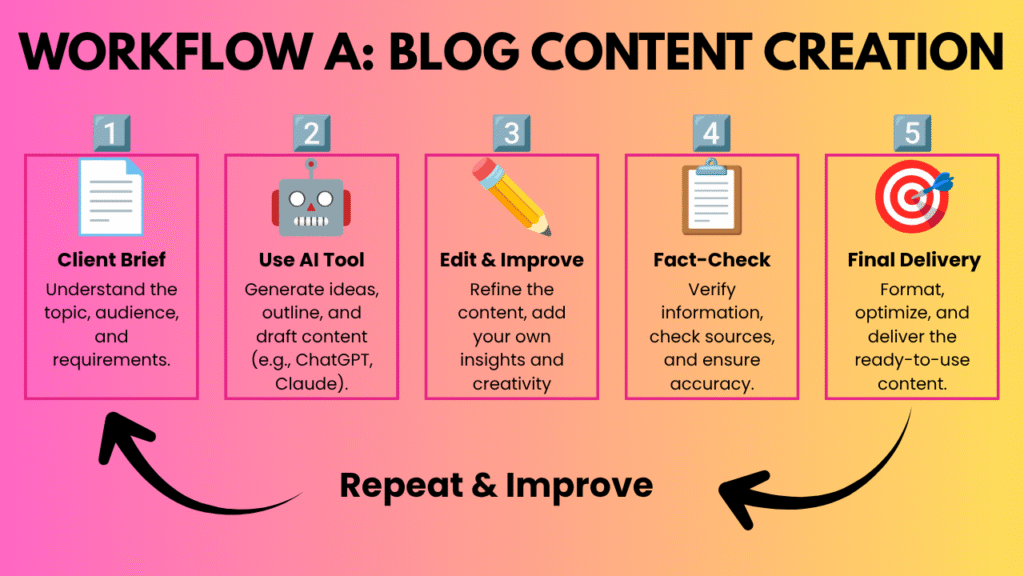
- Client Brief: Client requests a 1,200-word article on “Tips for First-Time Homebuyers.”
- Outline (AI): Prompt ChatGPT or Claude with the target audience and main subtopics to generate a structural outline.
- Drafting (AI): Generate initial section drafts using the outline as a guide.
- Fact-Checking (Human): Verify interest rates, official loan terms, and legal terminology referenced in the draft.
- Editing & Voice (Human): Rewrite awkward sentences, remove repetitive transitional phrases, and match the client’s brand tone.
- Final Delivery: Deliver a clean, verified, ready-to-publish document.
Workflow B: Social Media Graphic Design
- Client Request: A client needs 5 promotional graphics for an upcoming product launch.
- Concept & Prompting (AI): Use ChatGPT to generate visual concept ideas, then prompt Canva AI or Midjourney to create raw visual background elements.
- Layout & Typography (Human): Import the AI visuals into Canva or Photoshop. Add the client’s actual logo, promo copy, and brand colors manually.
- Consistency Check (Human): Ensure text alignment, padding, legibility, and contrast meet brand guidelines.
- Delivery: Export graphics in proper aspect ratios (e.g., 1:1, 9:16) for the client.
Workflow C: Short-Form Video Editing
- Raw File Intake: Client provides a 10-minute horizontal video recording of a presentation.
- Transcription & Clips (AI): Upload the video to Descript or CapCut. Let the tool transcribe the audio and identify potential short clips.
- Trimming & Cleanup (AI + Human): Automatically strip out silent pauses and filler words, then manually verify that the clip cuts make logical sense.
- Formatting & Captions (Human): Reframe the video to 9:16 vertical format, add automated captions, and correct any misspelled transcript words manually.
- Final Review: Export the 60-second clip and deliver it with suggested caption text.
4. AI Tools Comparison Table
Tool | Best For | Skill Level | What You Can Sell | Main Limitation |
ChatGPT | Outlining, drafting, brainstorming | Beginner | Article outlines, social copy, email drafts | Can generate incorrect facts or repetitive phrasing |
Claude | Long-form writing & document analysis | Beginner-Intermediate | Document summaries, detailed blog drafts | Free tier usage limits apply during heavy sessions |
Canva AI | Quick marketing visuals & layouts | Absolute Beginner | Social media assets, slide decks, ebooks | Custom image generation is less flexible than dedicated tools |
Midjourney | Unique artistic & photorealistic visuals | Intermediate | Custom blog headers, visual concepts, stock art | Requires clear prompting skills; text handling in images is limited |
Descript | Text-based audio & video editing | Beginner-Intermediate | Podcast post-production, social video clips | Automated transcripts require manual spell-checking |
ElevenLabs | Realistic text-to-speech voiceovers | Beginner | Narration for articles, videos, explainer audio | Character limits on low-tier plans; emotional range is limited |
Surfer SEO | On-page search content optimization | Intermediate | SEO content audits, search-optimized drafts | Can lead to mechanical writing if followed too strictly |
5. The Critical Role of Human Quality Control
AI tools generate starting points, not finished products. Clients pay for outcomes, accuracy, and reliability—not raw AI output.
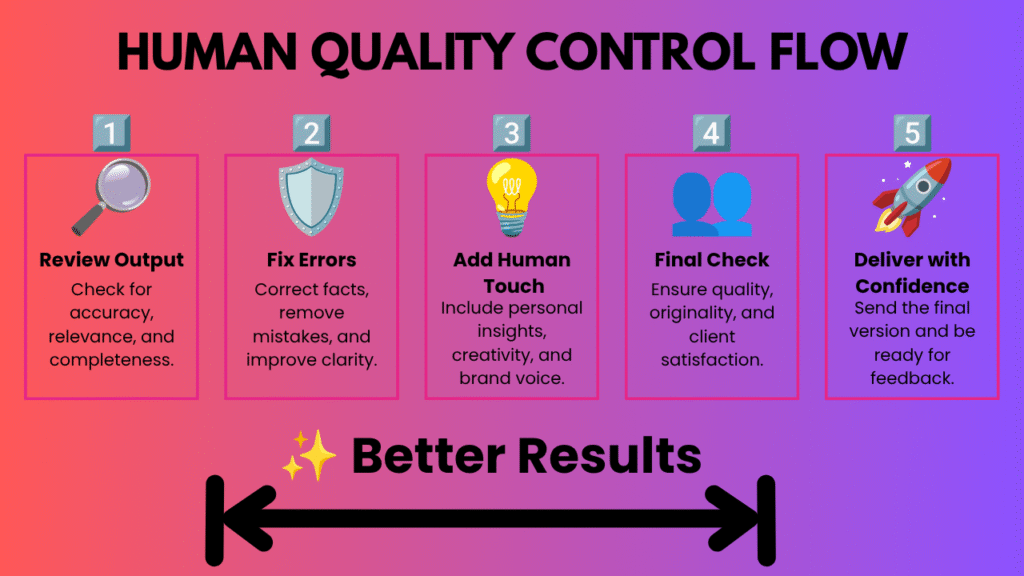
To deliver real value to clients, you must supply the human oversight AI lacks:
- Fact-Checking & Research: AI models do not “know” facts; they predict text patterns. You must verify dates, stats, quotes, and technical claims against credible primary sources.
- Tone & Brand Voice: Raw AI text often sounds generic, overly academic, or artificially enthusiastic. Humans must adjust pacing, word choices, and sentence structures to match a specific brand personality.
- Context & Audience Understanding: An AI tool does not understand your client’s business goals, local market nuances, or customer pain points unless you guide it and edit the output accordingly.
- Client Communication: Managing expectations, taking feedback, meeting deadlines, and delivering work in correct formats are human skills that build long-term freelance relationships.
6. Limitations, Risks, and Best Practices
When building AI-assisted workflows, keep these realistic constraints in mind:
- Accuracy Issues: AI models occasionally hallucinate facts or citations. Never deliver unverified AI output to a client.
- Copyright & Ownership: Copyright laws regarding pure AI-generated content vary by jurisdiction and are still evolving. Adding substantial human editing, layout work, and creative direction helps establish original ownership.
- Client AI Policies: Some clients strictly forbid AI-assisted tools for privacy or policy reasons, while others encourage them for speed. Always align with your client’s specific guidelines before starting work.
- Free Plan Limits: Most AI tools offer basic free tiers with functional restrictions, character caps, or rate limits. Factor tool costs into your service pricing as you scale.
- Changing Feature Sets: AI platforms update their pricing models, terms of service, and feature availability frequently. Relying on a single tool feature without understanding the core skill can create operational bottlenecks.
7. How to Get Started Realistically
Building an income using AI tools requires skill development, consistent effort, and client outreach. Results depend entirely on your effort, market demand, experience, and pricing strategy.
- Pick One Domain: Choose one area (text, graphics, video, or SEO) that aligns with your interest.
- Master One Core Tool: Spend time learning the inputs, settings, and limitations of a single tool before adding more to your tech stack.
- Practice on Sample Projects: Create 3–5 portfolio pieces for imaginary or local clients using the realistic workflows outlined above.
- Focus on the Outcome: When pitching services to potential clients, emphasize the final result—such as a polished article, clean video clip, or organized slide deck—rather than highlighting the tool used to create it.
Frequently Asked Questions
The easiest way for a beginner to get started is to find intelligent ideas that they like and that fit with what they are already interested in. For example, you can use ChatGPT to help you with writing or Canva Magic Studio to make graphics for people. These artificial intelligence apps help you do things faster and make it easier to finish jobs on websites like Upwork or Fiverr.
One of the artificial intelligence business ideas is to make digital things or websites about specific topics. You can use 10Web to build a website that runs on its own and Midjourney to make art for products that people can buy. This way, you can make money from intelligence even when you are not working. These tools help you build a store that can sell things on its own and make money for you all the time.
To grow your business without getting too tired, you should use intelligence tools that automate things, like Zapier, which connects all your work apps together. Buffer AI is also great for managing media schedules for clients, and Surfer SEO is one of the best artificial intelligence tools for businesses that want to be on the first page of Google. This helps you charge money for your services.
You can use Mailchimp AI to make email campaigns that are just for specific people and that help sell things. If you want to make money by advising businesses, Perplexity AI is great for researching the market and finding trends. These artificial intelligence ideas help you give businesses information, which makes it easier for them to grow.
People who make content can make a lot of things using HeyGen for videos and ChatGPT for writing and blogging. These tools are great because they help you make a lot of content and post it on YouTube, TikTok, and your blog, which is important for getting sponsors and making money from ads.
Yes, Perplexity AI is a tool for entrepreneurs who need to know what is happening in the market right now. It helps you look at ideas for businesses and see if they will work by looking at what competitors are doing and what people want. Using this with intelligence marketing strategies helps you make sure your new business is based on good information, which reduces the risk of starting something new.
Even though artificial intelligence automation tools are very powerful, you still need to check everything they do. To be good at intelligence jobs, you need to look at and edit everything that tools, like ChatGPT or Midjourney, make to ensure it sounds like the client’s brand. Being professional when using intelligence for freelance work means using technology to help you but also using your own expertise to make sure everything is high quality.