How We Built an Automated AI Content Engine with n8n (A Practical Step-by-Step Guide)
If you have ever tried running a blog or social channel while managing client work, you already know the pain. You start the month with big plans, but by week three, client emergencies take over and your publishing calendar goes completely silent.
The real issue usually isn’t coming up with ideas—it is the exhausting daily routine. Gathering research, writing drafts, fixing weird line breaks, converting text to Markdown, logging into three different websites, and copy-pasting content eats up hours every week.
That is exactly why we started building automated content pipelines with n8n.
Instead of treating content publishing as a daily manual chore, n8n lets you link your favorite apps, spreadsheets, and AI tools into a single system that runs smoothly on auto-pilot.
In this guide, we will skip the theoretical fluff and show you how to build a real, working AI content system from scratch—complete with practical setups, prompt tips, approval steps, and ready-to-use code.
1. What Does an Automated Content Pipeline Look Like?
Before jumping into the n8n visual editor, it helps to look at the whole setup like a pipeline on a factory floor. Data moves in one end, gets processed in the middle, and comes out as a finished piece of content at the other end.
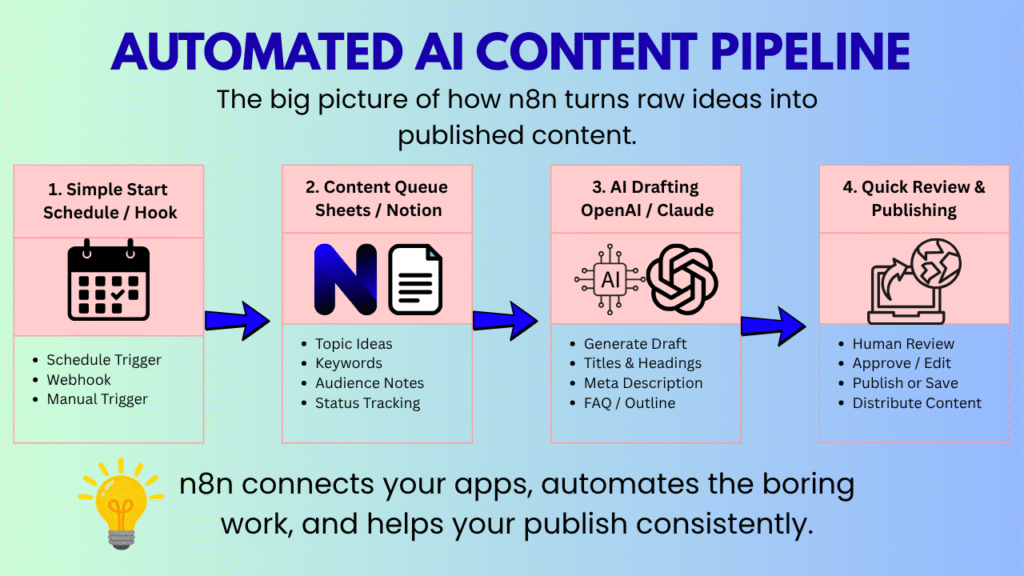
What n8n Actually Handles
Think of n8n as a friendly air traffic controller for your tech stack. It does not replace your tools—it just makes sure your spreadsheet, your AI model, and your website talk to each other without messy errors.
Unlike simple linear tools, n8n gives you a drag-and-drop canvas where you can:
- Clean up messy input: Strip out useless symbols or raw HTML before passing data to paid AI APIs.
- Fix formatting automatically: Turn plain text into clean, blog-ready Markdown with proper headings and lists.
- Route content smartly: Send long-form articles straight to WordPress while creating short snippets for social channels.
- Prevent crashes: Automatically retry actions if an API temporarily fails or times out.
2. Picking the Right AI Engine: OpenAI vs. Anthropic Claude
Choosing an AI model is like picking a co-writer. The tool you choose shapes the tone of your content, how well it follows directions, and how much you will pay each month.
| What You Need | OpenAI (GPT-4o) | Anthropic (Claude 3.5 Sonnet) |
|---|---|---|
| Main Strength | Super fast, great at structured data & JSON output | Reads very naturally, feels human, avoids cliché phrases |
| Context Limit | Big (128k Tokens) | Massive (200k Tokens) |
| Writing Style | Clean, direct, structured | Conversational, smooth, great for long reads |
| Best Used For | Short posts, data parsing, metadata tagging | Long blog posts, newsletter articles, in-depth tutorials |
Our Simple Rule of Thumb:
- Go with OpenAI if: You want speed, quick summaries, or need outputs strictly formatted into structured database rows.
- Go with Claude if: You are writing long-form articles and want the prose to feel natural right out of the gate without heavy editing.
3. Step-by-Step: Building Your First Content Pipeline
Let us walk through how data actually flows through the pipeline—from a raw topic idea to a published article draft.
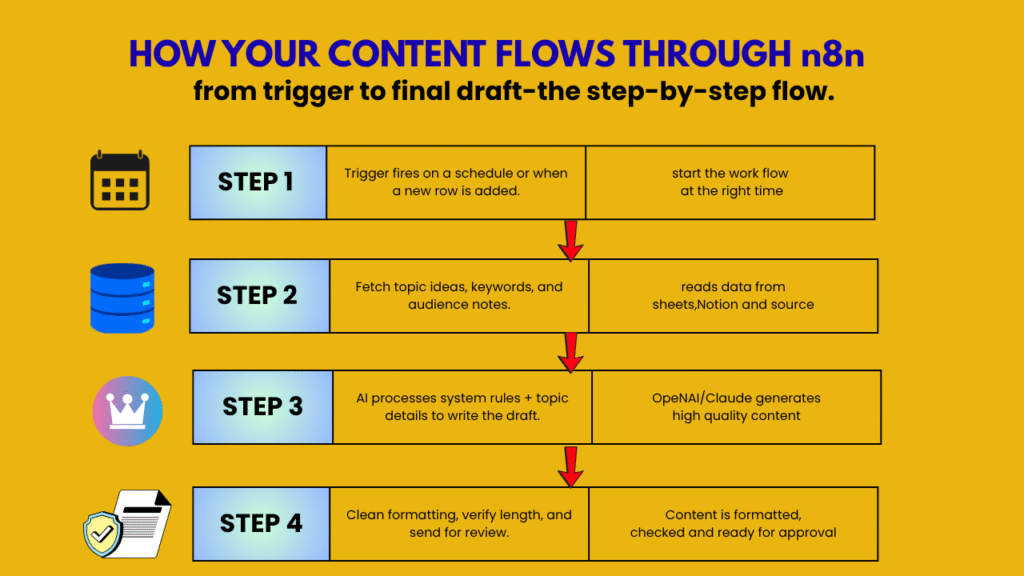
Step 1: Pick Your Starting Signal (The Trigger)
Every workflow needs a starting spark. You have three main options in n8n:
- Schedule Trigger: Set it to run automatically at specific times—for instance, every Monday at 9:00 AM.
- Webhook Trigger: Runs instantly whenever an external form is submitted or a button is clicked elsewhere.
- App Trigger: Some services, such as Google Sheets, provide dedicated trigger nodes that can start a workflow when specific changes occur. (like moving a status from “Idea” to “Ready”).
Step 2: Write Prompts That Don’t Sound Like a Robot
This is where most content automations quietly fail. Generic prompts produce dry, repetitive text full of corporate buzzwords. To keep things sounding human, split your prompt inside the n8n AI node into two parts:
1. System Prompt (The Golden Rules)
[SYSTEM PROMPT]
Act as an experienced technical writer talking to a colleague.
Write a clear, easy-to-read guide on the given topic.
Writing Rules:
- Use simple, conversational language (Aim for an 8th-grade reading level).
- Keep sentences clear and direct. Mix short and medium-length sentences.
- Avoid generic AI clichés like “game-changer”, “delve”, “unlock”, or “testament”.
- Use clear Markdown headings (H2s and H3s) to make scanning easy.
- Do NOT include fluff intros like “Here is your article on…”—jump straight into the story.
2. User Prompt (The Topic Variables)
[USER PROMPT]
Topic: {{ $json.topic }}
Target Audience: {{ $json.target_audience }}
Key Points to Cover: {{ $json.key_points }}
Step 3: Map Your Data Fields Correctly
Make sure your spreadsheet column names line up with what your n8n variables expect. A single typo in a field name can pause your entire run.
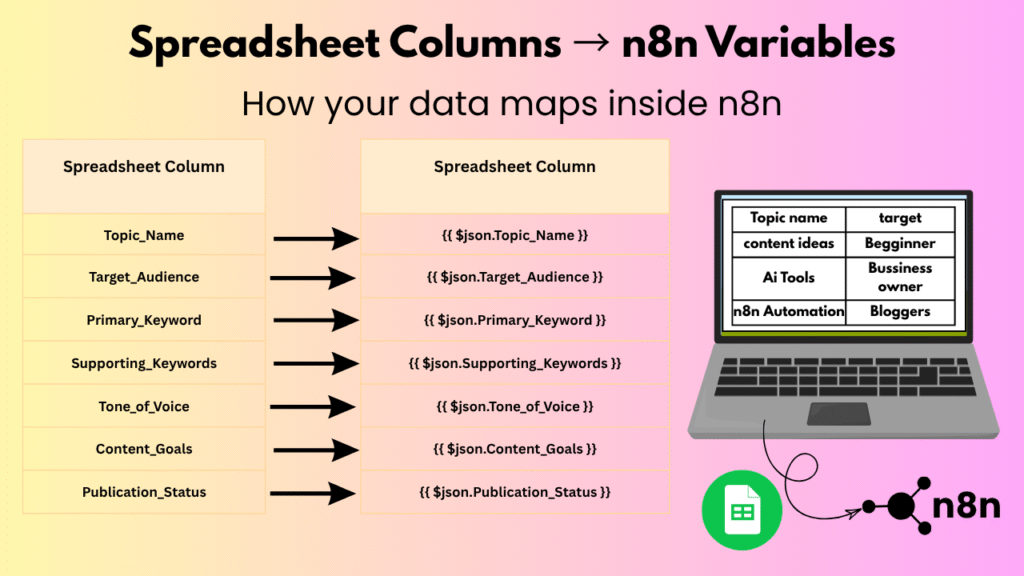
4. Copy & Import This Ready-to-Use n8n Workflow
Here is a clean, pre-built n8n workflow you can import right away.
How to use it:
- Copy the JSON code block below.
- Open your n8n visual canvas.
- Press Ctrl + V (or Cmd + V on Mac) to paste all configured nodes directly onto your screen.
JSON
					{
  "name": "Humanlike AI Content Pipeline",
  "nodes": [
    {
      "parameters": {
        "rule": {
          "interval": [
            {
              "field": "weeks",
              "triggerAtDay": [
                "1"
              ],
              "triggerAtHour": 9
            }
          ]
        }
      },
      "id": "1a2b3c4d-1111-4000-8000-000000000001",
      "name": "Run Every Monday Morning",
      "type": "n8n-nodes-base.scheduleTrigger",
      "typeVersion": 1.2,
      "position": [
        240,
        300
      ]
    },
    {
      "parameters": {
        "assignments": {
          "assignments": [
            {
              "id": "assign-topic",
              "name": "topic",
              "value": "Building Useful Automation Pipelines with Low-Code Tools",
              "type": "string"
            },
            {
              "id": "assign-target",
              "name": "target_audience",
              "value": "Small Business Owners and Creators",
              "type": "string"
            },
            {
              "id": "assign-points",
              "name": "key_points",
              "value": "Time savings, avoiding manual errors, keeping human control",
              "type": "string"
            }
          ]
        },
        "options": {}
      },
      "id": "2b3c4d5e-2222-4000-8000-000000000002",
      "name": "Set Topic Details",
      "type": "n8n-nodes-base.set",
      "typeVersion": 3.4,
      "position": [
        460,
        300
      ]
    },
    {
      "parameters": {
        "model": "gpt-4o",
        "options": {
          "temperature": 0.7
        },
        "prompt": "={{ 'Write an easy-to-read, human guide about: ' + $json.topic + '. Audience: ' + $json.target_audience + '. Make sure to cover: ' + $json.key_points }}"
      },
      "id": "3c4d5e6f-3333-4000-8000-000000000003",
      "name": "Generate Draft with AI",
      "type": "@n8n/n8n-nodes-langchain.openAi",
      "typeVersion": 1,
      "position": [
        680,
        300
      ],
      "credentials": {
        "openAiApi": {
          "id": "YOUR_OPENAI_CREDENTIAL_ID",
          "name": "OpenAI Account"
        }
      }
    },
    {
      "parameters": {
        "conditions": {
          "options": {
            "caseSensitive": true,
            "leftValue": "",
            "typeValidation": "strict"
          },
          "conditions": [
            {
              "id": "check-text",
              "leftValue": "={{ $json.text }}",
              "rightValue": "",
              "operator": {
                "type": "string",
                "operation": "notEmpty"
              }
            }
          ],
          "combinator": "and"
        },
        "options": {}
      },
      "id": "4d5e6f7g-4444-4000-8000-000000000004",
      "name": "Check Draft Exists",
      "type": "n8n-nodes-base.if",
      "typeVersion": 2.2,
      "position": [
        900,
        300
      ]
    }
  ],
  "connections": {
    "Run Every Monday Morning": {
      "main": [
        [
          {
            "node": "Set Topic Details",
            "type": "main",
            "index": 0
          }
        ]
      ]
    },
    "Set Topic Details": {
      "main": [
        [
          {
            "node": "Generate Draft with AI",
            "type": "main",
            "index": 0
          }
        ]
      ]
    },
    "Generate Draft with AI": {
      "main": [
        [
          {
            "node": "Check Draft Exists",
            "type": "main",
            "index": 0
          }
        ]
      ]
    }
  }
}
5. Adding a “Human Approval Gate” Before Publishing
Sending fully automated AI text straight to your live blog without anyone reading it is a bad idea. A smart setup includes a quick Human Review Step so you keep full control over what goes public.
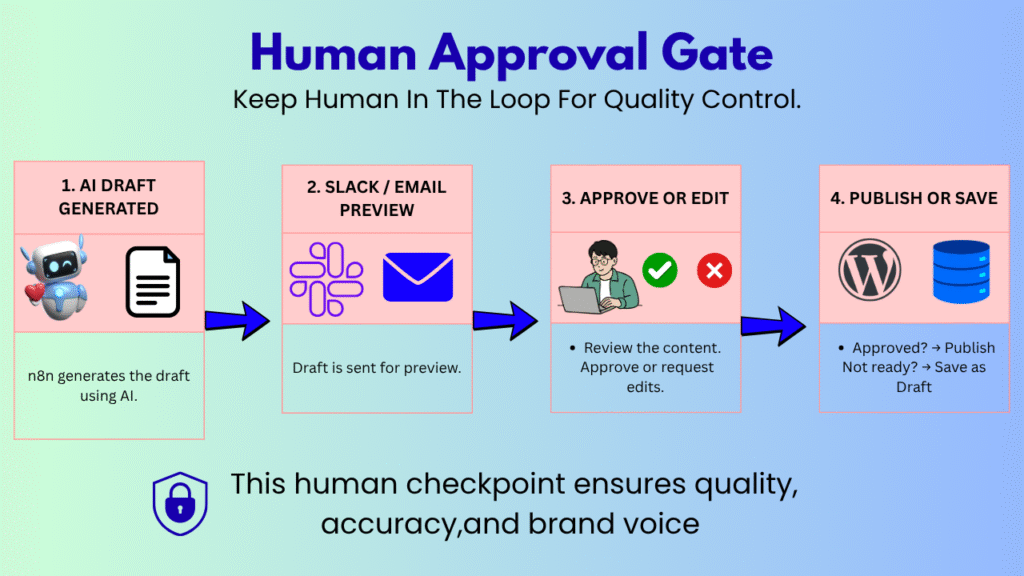
How to set this up easily:
- Once your AI node finishes drafting, route the text payload to a Slack Node or Email Node.
- Add simple action buttons at the bottom: Approve and Needs Edit.
- Use n8n’s Wait Node set to “Wait for Webhook Call”. The workflow safely pauses right there until you click a button.
- If you click Approve, n8n resumes and pushes the post straight to your WordPress dashboard.
6. How to Format Content for Multiple Channels
Different platforms need different content shapes. You don’t want a 2,000-word blog post dumped onto LinkedIn as one giant block of text.
Using an n8n Switch Node, you can split one main draft into tailored outputs for all your main channels:
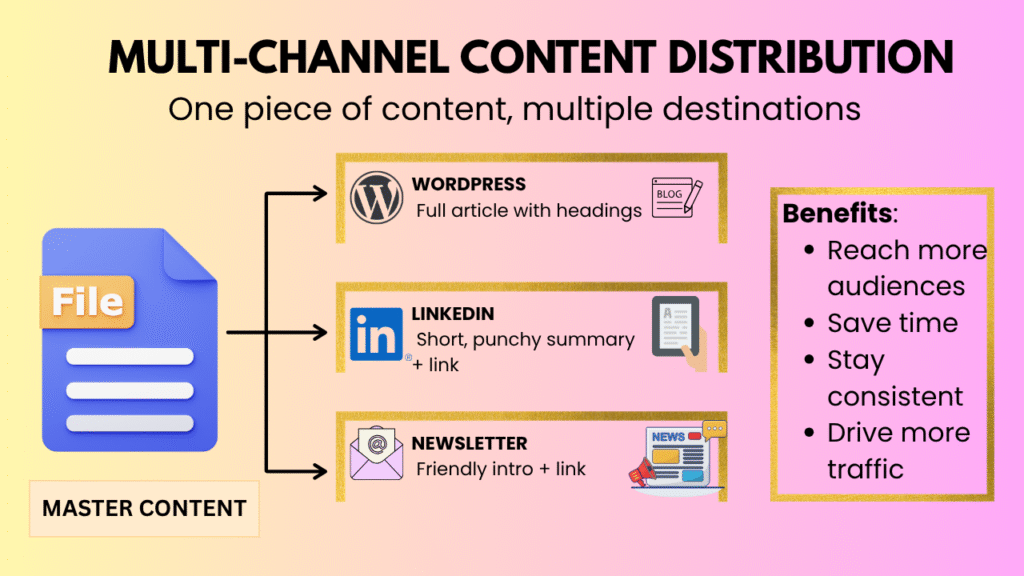
- For Blog Posts: Keep full Markdown headers (<h2>, <h3>), bullet points, and code blocks intact.
- For LinkedIn: Strip out complex HTML, keep paragraphs to 2-3 lines max, and lead with a strong opening hook.
- For Newsletters: Add a warm, conversational intro at the top and link out to the full article.
7. Simple Rules to Keep Your Workflows Running Smoothly
Workflows can break when APIs change or rate limits get hit. Here are three simple safety habits we use to keep things rock-solid:
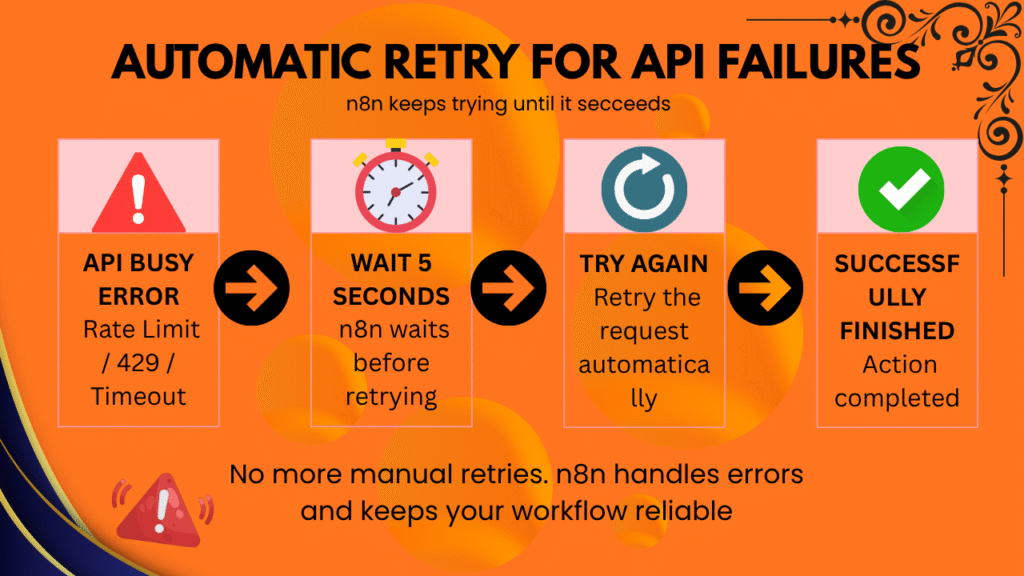
1. Enable Auto-Retries for Busy APIs
AI services occasionally slow down or hit temporary rate limits.
- Open your AI node settings in n8n.
- Go to Settings ➔ On Error.
- Toggle Retry on Fail to Enabled.
- Set it to try 3 times with a 5-second delay. This can help recover from temporary network errors and rate-limit related failures.
2. Never Paste API Keys Directly into Nodes
Always use n8n’s built-in Credentials Manager. Use n8n’s credential system instead of hard-coding API keys directly into workflow nodes. This reduces the chance of accidentally exposing secrets when sharing or editing workflows.
3. Check Execution Logs Once a Week
Spend two minutes every week checking your n8n Executions Tab. It shows you if any specific node is taking longer than usual or if your token usage is creeping up unnecessarily.
Final Quick Checklist Before Hitting Run
Step | What to Double Check | Status |
1. API Keys | All keys safely stored in n8n Credentials Manager | Checked |
2. Prompt Rules | Cliché words and filler phrases explicitly blocked | Checked |
3. Output Check | IF Node verified text isn’t empty before publishing | Checked |
4. Approval Step | Slack or Email notification node tested and working | Checked |
Automating your content setup isn’t about removing human creativity—it is about getting rid of boring copy-paste work so you can spend your time sharing real ideas with your audience.
Frequently Asked Questions
It’s low-code rather than fully no-code, which gives you much more flexibility for handling complex logic without needing a development team. Whether you choose n8n Cloud for speed or self-hosting for greater control, you can avoid the per-task pricing that some competitors charge.
It depends on what you’re writing. OpenAI (GPT-4o) is fast and versatile, making it well suited for high-volume blog work. Anthropic’s Claude tends to sound more natural and handles nuanced instructions well, which is why many people prefer it for longer, more detailed pieces. Testing both within the same n8n workflow is a reasonable way to decide which one works best for you.
Not really—just don’t hardcode them. Use n8n’s credential manager, which encrypts everything and keeps your connections to OpenAI, Anthropic, or Airtable secure without requiring any extra effort on your part.
Yes. Adding a new row to a sheet or database can kick off the entire pipeline—prompt generation, formatting, and even social snippets—with no manual steps in between.
n8n handles this cleanly with dedicated formatting nodes, and you can branch the logic so that the content is produced as Markdown for a blog and plain text for something like a LinkedIn post.
Error Trigger nodes and retry logic handle most issues automatically. Beyond that, checking your logs regularly for latency or token spikes can help you catch problems before they become recurring issues.
No. This is genuinely built for non-developers—just drag, drop, and connect. A bit of technical curiosity can help you troubleshoot faster, but you don’t need an engineering background to save significant time every week.