
How to Automate Your LinkedIn Posting With n8n: A Complete Step-by-Step Guide
Keeping a consistent presence on LinkedIn is one of those goals that sounds incredibly simple in theory—until you find yourself three weeks deep into total radio silence because client work got busy.
Most professionals do not stop posting on social media because they ran out of interesting things to say. They stop because logging in every single day, drafting a post, formatting it, uploading media, and hitting publish is just one more manual chore competing with twenty other urgent priorities.
This is exactly where n8n earns its keep. Instead of treating LinkedIn content distribution as a manual daily task, you can build an automated workflow that handles all the mechanical logistics—fetching raw content, formatting text, handling image uploads, and publishing on an optimal schedule—while you stay focused purely on high-level strategy and engagement.
In this comprehensive guide, we will break down how to set up, configure, and scale an automated LinkedIn posting pipeline using n8n from complete scratch.
Why Automate Your LinkedIn Content Pipeline?
The honest truth about social media marketing is that automation removes friction, and friction is the ultimate killer of consistency.
Posting consistently can help you build a regular audience and gives you more opportunities to learn what type of content performs well. A post that performs well today gains momentum partly because you posted consistently yesterday, and the day before that. Long gaps between posts can make it harder to maintain a consistent publishing habit and may reduce the number of opportunities you have to reach your audience.
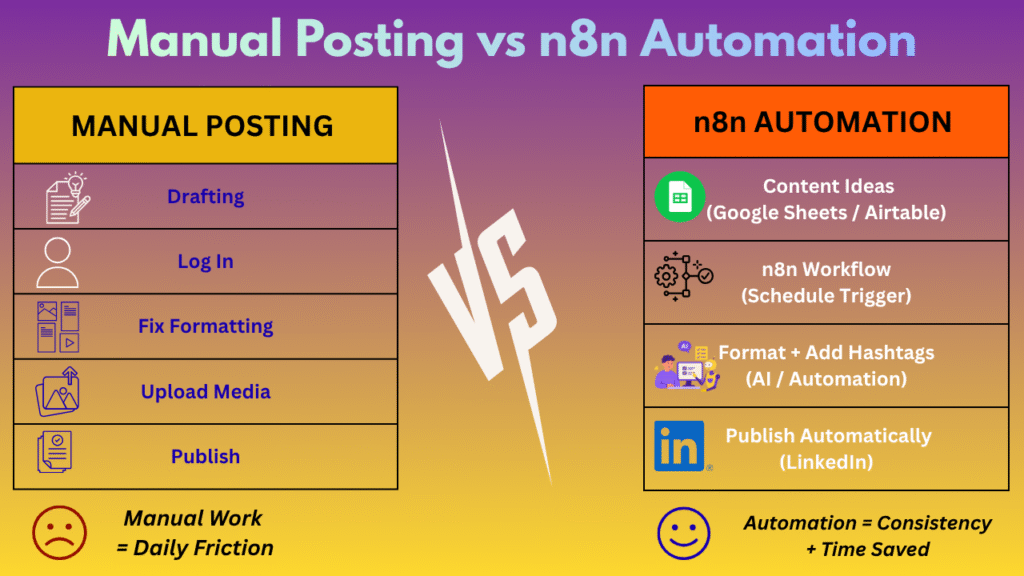
Key Benefits of Automating with n8n:
- Eliminate Context-Switching: You no longer need to interrupt your deep focus hours during the day just to send out a social post.
- Batch Production: You can draft, edit, and queue two to four weeks worth of content in a single one-hour session.
- Flawless Execution: Automated posts sent via structured API nodes eliminate accidental typos, broken preview links, or missed publishing windows.
- Algorithmic Consistency: Your content goes live during peak user scrolling hours, even if you are stuck in back-to-back meetings or sleeping.
Step 1: Choosing Your n8n Hosting Environment
Before building your first workflow canvas, you must decide where your n8n engine will run. n8n offers two primary hosting setups:
| Hosting Option | Best Suitable For | Pros | Considerations |
|---|---|---|---|
|
n8n Cloud |
Non-technical users & small teams
|
Zero server maintenance, instant updates, instant setup
|
Paid monthly subscription cost
|
|
Self-Hosted (Docker/VPS) |
Developers & privacy-focused businesses
|
Complete data privacy, zero usage fees, unlimited executions
|
Requires server management, updating, and SSL setup
|
For most users who want to avoid server upkeep, n8n Cloud is the path of least resistance. If you choose to self-host, deploying n8n via Docker on a low-cost VPS can be enough for a small self-hosted n8n setup, but the actual cost and available resources depend on the hosting provider and plan you choose.
Step 2: Configuring LinkedIn API Developer Credentials
To let n8n publish posts on your behalf, you need to establish a secure OAuth2 connection through LinkedIn’s Developer Portal. This step trips up many beginners, but following this exact sequence makes it straightforward:
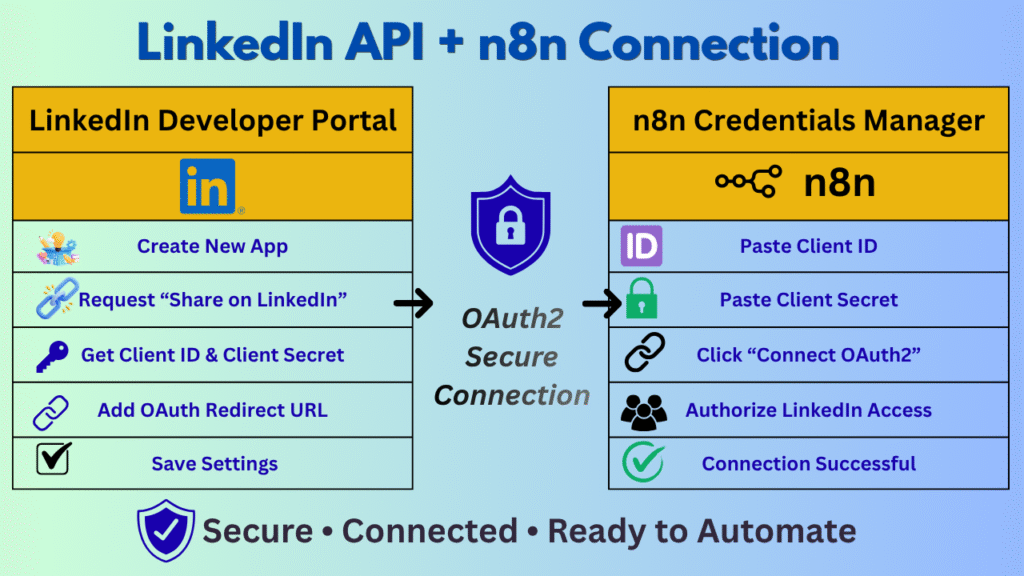
- Navigate to the LinkedIn Developer Portal (developer.linkedin.com) and log in with your primary LinkedIn account.
- Click Create App, enter your LinkedIn Company Page details, upload a logo, and save.
- Go to the Products tab within your app dashboard and request access to “Share on LinkedIn” and “Sign In with LinkedIn using OpenID Connect”.
- Go to the Auth tab and locate your Client ID and Client Secret.
- Add your n8n OAuth redirect URL into the Authorized Redirect URLs section (n8n will provide this callback URL inside the credential manager screen).
- Save your settings and keep your Client ID and Client Secret safe.
Step 3: Architecture of a Basic LinkedIn Automation Workflow
Once your environment and API credentials are ready, open the n8n canvas. A production-ready LinkedIn workflow generally consists of four core node categories:
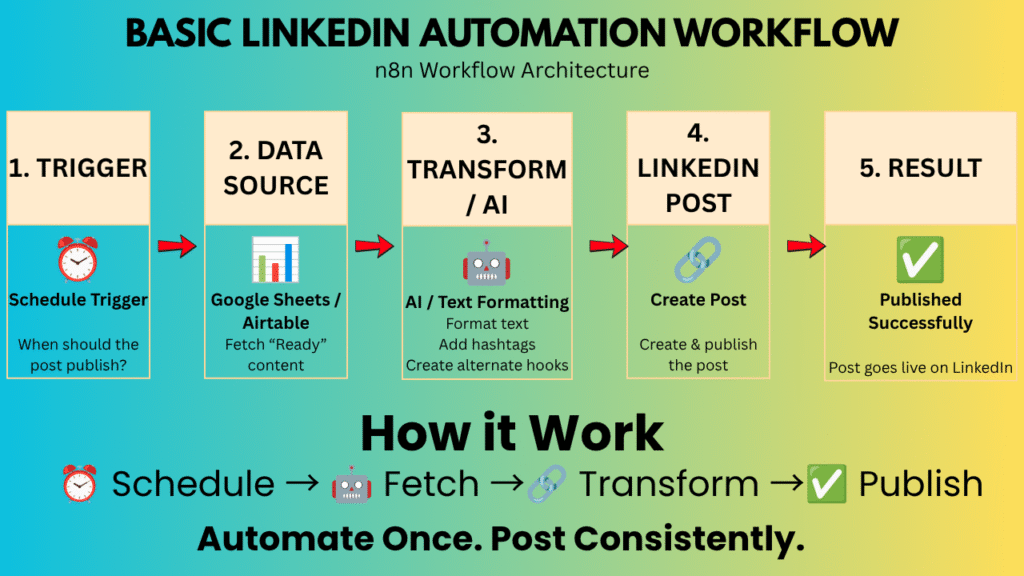
1. The Trigger Node (Schedule Trigger)
Instead of running manually, use the Schedule Trigger node. Set it to trigger at specific intervals—for instance, every Monday, Wednesday, and Friday at 09:00 AM in your target timezone.
2. The Data Source Node (Content Reservoir)
Connect a content store where your raw drafts live. Google Sheets, Notion databases, or Airtable bases work exceptionally well for this:
- Set up columns for: ID, Post_Text, Media_URL, Publish_Date, and Status.
- Configure the n8n node to fetch rows where Status equals “Ready” and Publish_Date matches today.
3. Data Transformation & AI Enrichment (Optional)
Insert an OpenAI / Anthropic Claude Node or a simple Code/Set Node between your spreadsheet and LinkedIn to polish your formatting:
- Add automatic line breaks and hashtags.
- Generate a short summary or alternate hook.
- Sanitize text parameters to ensure special characters don’t break the API call.
4. The LinkedIn Publishing Node
Select the official LinkedIn Node in n8n. Set the Resource to “Post” and Action to “Create”. Map your spreadsheet text parameter into the Text field, select your visibility preferences (Public), and run a test execution.
Code for Automation:
The exact node names, fields, and API requirements may change as n8n and LinkedIn update their platforms.
{
"name": "Automating LinkedIn Posting AI Agent",
"nodes": [
{
"parameters": {},
"id": "e6912e99-f930-4d25-a7b1-6a5bda6bcb45",
"name": "Manual Trigger",
"type": "n8n-nodes-base.manualTrigger",
"typeVersion": 1,
"position": [
-1180,
380
]
},
{
"parameters": {
"rule": {
"interval": [
{
"field": "days",
"daysInterval": 1,
"triggerAtHour": 9
}
]
}
},
"id": "6bd7a1a6-085e-4d7f-922b-7241af46a204",
"name": "Schedule Trigger (disabled - enable for auto-posting)",
"type": "n8n-nodes-base.scheduleTrigger",
"typeVersion": 1.2,
"position": [
-1180,
620
],
"disabled": true,
"notes": "Disabled by default. Enable + connect its output into 'Set Input Fields' (same as Manual Trigger) to run this workflow automatically on a schedule. When enabled for real automation, replace the static values in 'Set Input Fields' with a lookup to a content-calendar source (Google Sheets/Airtable) so each scheduled run gets a fresh topic."
},
{
"parameters": {
"mode": "manual",
"duplicateItem": false,
"assignments": {
"assignments": [
{
"id": "cd9611b4-0ddb-415c-b75e-8ed6980e7ca7",
"name": "topic",
"value": "5 lessons learned automating business workflows with n8n",
"type": "string"
},
{
"id": "8fcbf50c-8900-4770-a7d1-3cb68a36763f",
"name": "target_audience",
"value": "Tech founders and automation-curious professionals in Pakistan",
"type": "string"
},
{
"id": "065b492b-b64c-47f9-8d7a-f4cd99271086",
"name": "content_type",
"value": "educational",
"type": "string"
},
{
"id": "a4611182-d2e0-468d-8528-4dfa6734b421",
"name": "tone",
"value": "professional, human, conversational",
"type": "string"
},
{
"id": "dce990a6-efca-4ce5-923c-384b86b74591",
"name": "key_points",
"value": "",
"type": "string"
},
{
"id": "5ef9c9d6-55bd-4bd4-ac54-95dfb826e9a4",
"name": "call_to_action",
"value": "",
"type": "string"
},
{
"id": "f0137ca0-fa36-4024-978b-4a4e91c06067",
"name": "optional_url",
"value": "",
"type": "string"
},
{
"id": "ab67d77c-afac-48c2-b3ec-697c71d8bbac",
"name": "preferred_datetime",
"value": "",
"type": "string"
},
{
"id": "eb51994d-ee56-47a8-ac4e-844463401b7d",
"name": "regeneration_feedback",
"value": "",
"type": "string"
}
]
},
"options": {}
},
"id": "e339ae33-99ef-4e6d-bae1-493b637cfcb1",
"name": "Set Input Fields",
"type": "n8n-nodes-base.set",
"typeVersion": 3.4,
"position": [
-940,
380
],
"notes": "EDIT THESE VALUES BEFORE EACH MANUAL RUN. Any field left blank (content_type, tone, key_points, call_to_action, optional_url, preferred_datetime) is intentionally left for the AI Agent to decide sensibly based on topic. 'regeneration_feedback' stays empty on first run - it is populated automatically when a post is rejected or a regeneration is requested."
},
{
"parameters": {
"model": {
"__rl": true,
"value": "gpt-4.1",
"mode": "list"
},
"options": {
"temperature": 0.7
}
},
"id": "cab4f3a8-fea8-4e75-b5c7-9adb3b02927b",
"name": "OpenAI Chat Model",
"type": "@n8n/n8n-nodes-langchain.lmChatOpenAi",
"typeVersion": 1.2,
"position": [
-660,
620
],
"credentials": {
"openAiApi": {
"id": "REPLACE_WITH_YOUR_CREDENTIAL_ID",
"name": "OpenAi account"
}
},
"notes": "Requires an OpenAI API credential configured in n8n Credentials (Settings > Credentials > OpenAI API). Swap the model for any chat model you have access to (e.g. gpt-4o) - just keep it a model that reliably returns valid JSON."
},
{
"parameters": {
"schemaType": "manual",
"inputSchema": "{\n \"type\": \"object\",\n \"required\": [\n \"post\",\n \"hashtags\",\n \"call_to_action\",\n \"content_type\",\n \"status\"\n ],\n \"properties\": {\n \"post\": {\n \"type\": \"string\",\n \"description\": \"Final LinkedIn post text\"\n },\n \"hashtags\": {\n \"type\": \"array\",\n \"items\": {\n \"type\": \"string\"\n },\n \"description\": \"3-5 relevant hashtags, each starting with #\"\n },\n \"call_to_action\": {\n \"type\": \"string\"\n },\n \"content_type\": {\n \"type\": \"string\",\n \"description\": \"educational/promotional/story/opinion/etc.\"\n },\n \"status\": {\n \"type\": \"string\",\n \"description\": \"always 'draft' at this stage\"\n }\n }\n}"
},
"id": "6e6312d7-587a-4cd9-8b5c-4ba984f0df06",
"name": "Structured Output Parser",
"type": "@n8n/n8n-nodes-langchain.outputParserStructured",
"typeVersion": 1.2,
"position": [
-500,
620
],
"notes": "Forces the AI Agent to return exactly the JSON schema required by the workflow (post, hashtags, call_to_action, content_type, status). If the model output ever fails schema validation, the Agent node will retry automatically."
},
{
"parameters": {
"promptType": "define",
"text": "Create a LinkedIn post.\n\nTopic: {{$json.topic}}\nTarget audience: {{$json.target_audience}}\nContent type: {{$json.content_type}}\nTone: {{$json.tone}}\nKey points to include: {{$json.key_points}}\nRequested call to action: {{$json.call_to_action}}\nOptional URL to reference (do not fabricate a link if this is blank): {{$json.optional_url}}\nPreferred posting date/time (for your context only, do not mention scheduling mechanics in the post itself): {{$json.preferred_datetime}}\n\nReviewer feedback from a previous rejected/regenerated draft, if any - address it directly in this new version: {{$json.regeneration_feedback}}\n\nIf target_audience, content_type, tone, key_points, or call_to_action are blank, intelligently decide what fits best for the topic. Never invent facts, statistics, personal experiences, achievements, clients, or case studies that were not provided above.",
"options": {
"systemMessage": "You are an expert LinkedIn content strategist and copywriter. Your job is to create valuable, authentic, professional LinkedIn posts that educate, engage, or inspire the target audience. Write naturally and avoid generic AI-sounding language. Use a strong opening hook, concise paragraphs, useful insights, and a relevant call to action. Do not invent facts, statistics, personal experiences, clients, achievements, or case studies. Use hashtags sparingly and only when relevant.\n\nFormatting rules:\n- Start with a strong hook in the first line.\n- Use short paragraphs (1-3 sentences) with line breaks for LinkedIn readability.\n- Avoid unnecessary jargon and avoid excessive emojis.\n- Include practical insight or value, not just opinion.\n- Add a clear call to action when appropriate.\n- Generate 3-5 relevant hashtags separately from the post body (do not stuff them into the post text itself).\n- Keep the post body under roughly 1300 characters so it reads well on LinkedIn.\n- Return ONLY the structured JSON output as instructed - no extra commentary.",
"maxIterations": 3
},
"hasOutputParser": true,
"onError": "continueErrorOutput"
},
"id": "5340f870-4d69-424d-9104-d5652d3f34ad",
"name": "Generate LinkedIn Post (AI Agent)",
"type": "@n8n/n8n-nodes-langchain.agent",
"typeVersion": 1.7,
"position": [
-660,
380
],
"notes": "Core content generation. Loops back to here automatically on Reject/Regenerate, with reviewer feedback injected via 'regeneration_feedback'. Error output (right/lower branch) fires if the LLM call fails after retries, and is wired to the AI-generation-failure notifier so the run never publishes a broken post."
},
{
"parameters": {
"jsCode": "// Normalize the AI Agent's structured output and carry through the original input fields\nconst agentOutput = $input.first().json.output || $input.first().json;\nconst inputData = $('Set Input Fields').first().json;\n\nlet hashtags = agentOutput.hashtags || [];\nif (typeof hashtags === 'string') {\n hashtags = hashtags.split(/[,\\s]+/).filter(h => h.startsWith('#'));\n}\n\nreturn [{\n json: {\n topic: inputData.topic,\n target_audience: inputData.target_audience,\n optional_url: inputData.optional_url,\n preferred_datetime: inputData.preferred_datetime,\n post: agentOutput.post,\n hashtags: hashtags,\n call_to_action: agentOutput.call_to_action,\n content_type: agentOutput.content_type,\n status: 'draft',\n regeneration_feedback: inputData.regeneration_feedback || ''\n }\n}];"
},
"id": "d75bd43c-0771-4e26-886d-70836dcf5134",
"name": "Format AI Output",
"type": "n8n-nodes-base.code",
"typeVersion": 2,
"position": [
-420,
380
],
"notes": "Flattens the Agent's structured JSON and re-attaches the original input fields (topic, audience, url, preferred time) that the Agent node itself does not pass through."
},
{
"parameters": {
"resource": "message",
"operation": "sendAndWait",
"sendTo": "YOUR_APPROVER_EMAIL@example.com",
"subject": "=Approve LinkedIn post: {{$json.topic}}",
"message": "<h2>New LinkedIn post ready for review</h2><p><b>Topic:</b> {{$json.topic}}</p><p><b>Content type:</b> {{$json.content_type}}</p><hr><p style=\"white-space:pre-line\">{{$json.post}}</p><hr><p><b>Hashtags:</b> {{$json.hashtags.join(' ')}}</p><p><b>Call to action:</b> {{$json.call_to_action}}</p><p><b>Optional URL:</b> {{$json.optional_url}}</p><p>Choose a decision below. If you choose Reject or Regenerate, add feedback in the text box so the AI can improve the next draft.</p>",
"responseType": "customForm",
"formFields": {
"values": [
{
"fieldLabel": "Decision",
"fieldType": "dropdown",
"fieldOptions": {
"values": [
{
"option": "Approve"
},
{
"option": "Reject"
},
{
"option": "Regenerate"
}
]
},
"requiredField": true
},
{
"fieldLabel": "Feedback (required for Reject/Regenerate)",
"fieldType": "text",
"requiredField": false
}
]
},
"options": {
"limitWaitTime": {
"limitType": "afterTimeInterval",
"resumeAmount": 48,
"resumeUnit": "hours"
}
},
"onError": "continueErrorOutput"
},
"id": "7156c7fc-12ba-41fe-8262-01a369e0b702",
"name": "Request Approval (Email)",
"type": "n8n-nodes-base.gmail",
"typeVersion": 2.1,
"position": [
-180,
380
],
"credentials": {
"gmailOAuth2": {
"id": "REPLACE_WITH_YOUR_CREDENTIAL_ID",
"name": "Gmail account"
}
},
"notes": "REPLACE 'YOUR_APPROVER_EMAIL@example.com' with the real approver address. Pauses the workflow (no polling, no wasted executions) until someone submits the form, or for a maximum of 48 hours. Swap the Gmail node for Slack/Microsoft Teams/Telegram 'Send and Wait' if you prefer approving from chat instead of email - the Decision/Feedback field structure works the same way. The error output (used on timeout) is wired to the timeout notifier and NEVER reaches the LinkedIn publish node, per the 'no publish before explicit approval' requirement."
},
{
"parameters": {
"resource": "message",
"operation": "send",
"sendTo": "YOUR_APPROVER_EMAIL@example.com",
"subject": "=Approval timed out: {{$json.topic}}",
"message": "=The approval request for the LinkedIn post about \"{{$json.topic}}\" timed out after 48 hours with no response. The post was NOT published. Re-run the workflow if you still want to post this content."
},
"id": "c52c2514-3c5a-425a-a92e-97121fc927e6",
"name": "Notify Approval Timeout",
"type": "n8n-nodes-base.gmail",
"typeVersion": 2.1,
"position": [
-180,
180
],
"credentials": {
"gmailOAuth2": {
"id": "REPLACE_WITH_YOUR_CREDENTIAL_ID",
"name": "Gmail account"
}
},
"notes": "Fires only when the approval request errors out (timeout). Deliberately has no path to LinkedIn Publish."
},
{
"parameters": {
"rules": {
"values": [
{
"conditions": {
"options": {
"caseSensitive": true,
"leftValue": "",
"typeValidation": "strict"
},
"conditions": [
{
"leftValue": "={{$json.data.Decision}}",
"rightValue": "Approve",
"operator": {
"type": "string",
"operation": "equals"
}
}
],
"combinator": "and"
},
"renameOutput": true,
"outputKey": "Approve"
},
{
"conditions": {
"options": {
"caseSensitive": true,
"leftValue": "",
"typeValidation": "strict"
},
"conditions": [
{
"leftValue": "={{$json.data.Decision}}",
"rightValue": "Reject",
"operator": {
"type": "string",
"operation": "equals"
}
}
],
"combinator": "and"
},
"renameOutput": true,
"outputKey": "Reject"
},
{
"conditions": {
"options": {
"caseSensitive": true,
"leftValue": "",
"typeValidation": "strict"
},
"conditions": [
{
"leftValue": "={{$json.data.Decision}}",
"rightValue": "Regenerate",
"operator": {
"type": "string",
"operation": "equals"
}
}
],
"combinator": "and"
},
"renameOutput": true,
"outputKey": "Regenerate"
}
]
},
"options": {}
},
"id": "650107ad-8fd1-491f-a797-fe0c64cbc463",
"name": "Route Approval Decision",
"type": "n8n-nodes-base.switch",
"typeVersion": 3,
"position": [
60,
380
],
"notes": "Reads the 'Decision' dropdown submitted on the approval form. Output 0 = Approve -> publishing path. Output 1 = Reject and Output 2 = Regenerate both loop back to the AI Agent with feedback attached."
},
{
"parameters": {
"jsCode": "// Feed reviewer feedback back into the same shape 'Set Input Fields' produces,\n// so the AI Agent node (which reads from 'Set Input Fields') generates a revised draft.\nconst original = $('Set Input Fields').first().json;\nconst draft = $('Format AI Output').first().json;\nconst decision = $json.data.Decision;\nconst feedback = $json.data['Feedback (required for Reject/Regenerate)'] || '';\n\nreturn [{\n json: {\n ...original,\n regeneration_feedback: `Previous draft was ${decision.toUpperCase()} by the reviewer. `\n + (feedback ? `Reviewer feedback: ${feedback}` : 'No specific feedback was given - try a meaningfully different angle or hook.')\n }\n}];"
},
"id": "263e8e0f-10aa-482d-897f-a44894aa29ce",
"name": "Prepare Regeneration Instructions",
"type": "n8n-nodes-base.code",
"typeVersion": 2,
"position": [
60,
580
],
"notes": "Both Reject and Regenerate route here. Output loops back into 'Generate LinkedIn Post (AI Agent)', which re-runs with the reviewer's feedback, then flows through Format AI Output and Request Approval again."
},
{
"parameters": {
"jsCode": "// Idempotency guard: prevents the same workflow execution from ever publishing twice,\n// e.g. if 'Publish to LinkedIn' is manually retried after a partial failure.\nconst staticData = $getWorkflowStaticData('node');\nif (!staticData.publishedExecutionIds) staticData.publishedExecutionIds = [];\n\nconst executionId = $execution.id;\nconst alreadyPublished = staticData.publishedExecutionIds.includes(executionId);\n\nreturn [{\n json: {\n ...$json,\n already_published: alreadyPublished,\n execution_id: executionId\n }\n}];"
},
"id": "d67d2f67-ff05-4f3b-a70f-0fd328095b87",
"name": "Duplicate Publish Guard",
"type": "n8n-nodes-base.code",
"typeVersion": 2,
"position": [
300,
220
],
"notes": "Uses workflow static data (persists across retries of the same execution) to flag if this execution has already published. Combined with the IF node right after, this guarantees 'never publish duplicate posts accidentally' even if a node downstream is retried."
},
{
"parameters": {
"conditions": {
"options": {
"caseSensitive": true,
"leftValue": "",
"typeValidation": "strict"
},
"conditions": [
{
"leftValue": "={{$json.already_published}}",
"rightValue": true,
"operator": {
"type": "boolean",
"operation": "equals"
}
}
],
"combinator": "and"
},
"options": {}
},
"id": "ad96f418-4f9d-4445-947b-9dc6857bc92c",
"name": "Already Published?",
"type": "n8n-nodes-base.if",
"typeVersion": 2.2,
"position": [
540,
220
],
"notes": "True branch (already published) -> skip straight to a no-op notification. False branch -> proceed to LinkedIn Publish."
},
{
"parameters": {
"resource": "post",
"operation": "create",
"person": "REPLACE_WITH_YOUR_LINKEDIN_PERSON_URN",
"text": "={{$json.post}}\n\n{{$json.hashtags.join(' ')}}",
"shareMediaCategory": "NONE",
"additionalFields": {},
"onError": "continueErrorOutput"
},
"id": "bfe41634-36e8-41ce-b09f-76660bac99ee",
"name": "Publish to LinkedIn",
"type": "n8n-nodes-base.linkedIn",
"typeVersion": 1,
"position": [
780,
140
],
"credentials": {
"linkedInOAuth2Api": {
"id": "REPLACE_WITH_YOUR_CREDENTIAL_ID",
"name": "LinkedIn account"
}
},
"notes": "PLACEHOLDER - REQUIRES SETUP:\n1) Create a LinkedIn OAuth2 credential in n8n (Settings > Credentials > LinkedIn). This requires a LinkedIn Developer App with the 'Share on LinkedIn' (w_member_social) product approved - LinkedIn manually reviews this, it is not instant.\n2) Set 'person' to your LinkedIn member URN (format: urn:li:person:XXXXXXXX), obtained via the LinkedIn OAuth flow or the /v2/me endpoint. For posting to a Company Page instead, set resource to 'post' with an organization URN and use the 'w_organization_social' scope instead.\n3) If the optional_url field is present, consider adding it as an article attachment via additionalFields (shareMediaCategory: 'ARTICLE') instead of inline text - left as plain text here for simplicity.\nUntil steps 1-2 are done this node will fail authentication - that failure is caught by onError and routed to the failure-logging branch, so no execution ever silently disappears."
},
{
"parameters": {
"mode": "manual",
"assignments": {
"assignments": [
{
"id": "2da5d4b8-4dfd-4d68-ab8d-33112f8983cc",
"name": "topic",
"value": "={{$json.topic}}",
"type": "string"
},
{
"id": "c11dff60-7496-488c-afe2-f8d55d9c4173",
"name": "final_post",
"value": "={{$json.post}}",
"type": "string"
},
{
"id": "75ceeb65-bf75-4267-b554-61faad8198f9",
"name": "hashtags",
"value": "={{$json.hashtags.join(' ')}}",
"type": "string"
},
{
"id": "21d09d31-0eb8-48ec-a8bb-6d860c96e7f5",
"name": "publish_datetime",
"value": "={{$now.toISO()}}",
"type": "string"
},
{
"id": "f709392c-bda4-47e9-882c-5f810b668a19",
"name": "linkedin_post_id",
"value": "={{$json.id || ''}}",
"type": "string"
},
{
"id": "0a39990d-0f07-4327-b313-7faadbcd2d09",
"name": "status",
"value": "success",
"type": "string"
},
{
"id": "eefabae8-c7f3-43a4-9e16-fbb1d63202ed",
"name": "error_message",
"value": "",
"type": "string"
}
]
},
"options": {}
},
"id": "219b1ec2-0249-41e2-861d-8ac836b027da",
"name": "Prepare Success Log Entry",
"type": "n8n-nodes-base.set",
"typeVersion": 3.4,
"position": [
1020,
60
]
},
{
"parameters": {
"operation": "append",
"documentId": {
"__rl": true,
"value": "REPLACE_WITH_YOUR_GOOGLE_SHEET_ID",
"mode": "id"
},
"sheetName": {
"__rl": true,
"value": "Log",
"mode": "name"
},
"columns": {
"mappingMode": "defineBelow",
"value": {
"Topic": "={{$json.topic}}",
"Final Post": "={{$json.final_post}}",
"Hashtags": "={{$json.hashtags}}",
"Publish Datetime": "={{$json.publish_datetime}}",
"LinkedIn Post ID": "={{$json.linkedin_post_id}}",
"Status": "={{$json.status}}",
"Error Message": "={{$json.error_message}}"
}
},
"options": {}
},
"id": "a82ecb5b-e9aa-41ac-963b-79a6113a06b3",
"name": "Log to Google Sheets (Success)",
"type": "n8n-nodes-base.googleSheets",
"typeVersion": 4.5,
"position": [
1260,
60
],
"credentials": {
"googleSheetsOAuth2Api": {
"id": "REPLACE_WITH_YOUR_CREDENTIAL_ID",
"name": "Google Sheets account"
}
},
"notes": "REPLACE the Google Sheet ID. Expected header row: Topic | Final Post | Hashtags | Publish Datetime | LinkedIn Post ID | Status | Error Message. Swap for Airtable's Append node if you prefer Airtable - same field mapping applies."
},
{
"parameters": {
"resource": "message",
"operation": "send",
"sendTo": "YOUR_APPROVER_EMAIL@example.com",
"subject": "=Published to LinkedIn: {{$json.topic}}",
"message": "=Your post about \"{{$json.topic}}\" was published successfully.\n\nPost ID: {{$json.linkedin_post_id}}\nPublished at: {{$json.publish_datetime}}"
},
"id": "ae8a2ea8-a54b-425a-bae3-8306ab3d5b99",
"name": "Notify Success",
"type": "n8n-nodes-base.gmail",
"typeVersion": 2.1,
"position": [
1500,
60
],
"credentials": {
"gmailOAuth2": {
"id": "REPLACE_WITH_YOUR_CREDENTIAL_ID",
"name": "Gmail account"
}
}
},
{
"parameters": {
"mode": "manual",
"assignments": {
"assignments": [
{
"id": "c5501d92-4309-4319-9f13-d1c674214145",
"name": "topic",
"value": "={{$json.topic}}",
"type": "string"
},
{
"id": "4e1db107-0551-4657-a5be-f0fb2a9588f8",
"name": "final_post",
"value": "={{$json.post}}",
"type": "string"
},
{
"id": "2d611e99-9512-4d60-b0c1-90983de11e56",
"name": "hashtags",
"value": "={{$json.hashtags.join(' ')}}",
"type": "string"
},
{
"id": "da5567ff-341f-4d19-a2e0-bc8b8671bef6",
"name": "publish_datetime",
"value": "={{$now.toISO()}}",
"type": "string"
},
{
"id": "9877bab6-3e7c-4d7c-a79d-00cd39a4d8bc",
"name": "linkedin_post_id",
"value": "",
"type": "string"
},
{
"id": "c8d07132-3243-4b18-8bda-efc50ace6a00",
"name": "status",
"value": "failed",
"type": "string"
},
{
"id": "200a19f4-bec4-4c95-9d12-41a3cc19d5da",
"name": "error_message",
"value": "={{$json.error?.message || 'LinkedIn publish failed - see execution log'}}",
"type": "string"
}
]
},
"options": {}
},
"id": "c90de754-c4d5-45c6-8d2e-ccd5c732ddd2",
"name": "Prepare Failure Log Entry",
"type": "n8n-nodes-base.set",
"typeVersion": 3.4,
"position": [
1020,
260
]
},
{
"parameters": {
"operation": "append",
"documentId": {
"__rl": true,
"value": "REPLACE_WITH_YOUR_GOOGLE_SHEET_ID",
"mode": "id"
},
"sheetName": {
"__rl": true,
"value": "Log",
"mode": "name"
},
"columns": {
"mappingMode": "defineBelow",
"value": {
"Topic": "={{$json.topic}}",
"Final Post": "={{$json.final_post}}",
"Hashtags": "={{$json.hashtags}}",
"Publish Datetime": "={{$json.publish_datetime}}",
"LinkedIn Post ID": "={{$json.linkedin_post_id}}",
"Status": "={{$json.status}}",
"Error Message": "={{$json.error_message}}"
}
},
"options": {}
},
"id": "61128f21-3b6c-44eb-9b71-bd6709503e1d",
"name": "Log to Google Sheets (Failure)",
"type": "n8n-nodes-base.googleSheets",
"typeVersion": 4.5,
"position": [
1260,
260
],
"credentials": {
"googleSheetsOAuth2Api": {
"id": "REPLACE_WITH_YOUR_CREDENTIAL_ID",
"name": "Google Sheets account"
}
}
},
{
"parameters": {
"resource": "message",
"operation": "send",
"sendTo": "YOUR_APPROVER_EMAIL@example.com",
"subject": "=LinkedIn publish FAILED: {{$json.topic}}",
"message": "=Publishing the approved post about \"{{$json.topic}}\" to LinkedIn failed.\n\nError: {{$json.error_message}}\n\nThe post was NOT published. Check the LinkedIn credential/connection and re-run the workflow from the approval step if needed."
},
"id": "344260a7-09d0-49e9-86dc-870b639cbaaf",
"name": "Notify Publish Failure",
"type": "n8n-nodes-base.gmail",
"typeVersion": 2.1,
"position": [
1500,
260
],
"credentials": {
"gmailOAuth2": {
"id": "REPLACE_WITH_YOUR_CREDENTIAL_ID",
"name": "Gmail account"
}
}
},
{
"parameters": {
"resource": "message",
"operation": "send",
"sendTo": "YOUR_APPROVER_EMAIL@example.com",
"subject": "=Skipped duplicate publish: {{$json.topic}}",
"message": "=This execution had already published \"{{$json.topic}}\" to LinkedIn once. A second publish attempt within the same execution was skipped to avoid a duplicate post."
},
"id": "7f6ce2d9-e739-4357-ad5d-3d96491e9641",
"name": "Notify Duplicate Skipped",
"type": "n8n-nodes-base.gmail",
"typeVersion": 2.1,
"position": [
780,
400
],
"credentials": {
"gmailOAuth2": {
"id": "REPLACE_WITH_YOUR_CREDENTIAL_ID",
"name": "Gmail account"
}
}
},
{
"parameters": {
"resource": "message",
"operation": "send",
"sendTo": "YOUR_APPROVER_EMAIL@example.com",
"subject": "AI content generation failed",
"message": "=The AI Agent failed to generate a LinkedIn post for topic \"{{$('Set Input Fields').first().json.topic}}\" after retries. Check the OpenAI credential, model access, and the execution log for details. Nothing was sent for approval or published."
},
"id": "d7926903-25d0-46cf-813b-f48e21303d1b",
"name": "Notify AI Generation Failure",
"type": "n8n-nodes-base.gmail",
"typeVersion": 2.1,
"position": [
-420,
180
],
"credentials": {
"gmailOAuth2": {
"id": "REPLACE_WITH_YOUR_CREDENTIAL_ID",
"name": "Gmail account"
}
}
},
{
"parameters": {
"content": "## 1. INPUT\nManual Trigger (or the disabled Schedule Trigger, once you connect + enable it) feeds 'Set Input Fields'. Edit the values there before each manual run. Blank optional fields are intentional - the AI Agent fills gaps sensibly.",
"height": 260,
"width": 320,
"color": 4
},
"id": "9a543131-30aa-4b61-9687-7cd22f104868",
"name": "Sticky Note 1",
"type": "n8n-nodes-base.stickyNote",
"typeVersion": 1,
"position": [
-1180,
60
]
},
{
"parameters": {
"content": "## 2. AI CONTENT GENERATION\nOpenAI Chat Model + Structured Output Parser feed the AI Agent, which returns strict JSON: post, hashtags, call_to_action, content_type, status. 'Format AI Output' flattens it and carries input fields through. This is also the loop-back target for Reject/Regenerate.",
"height": 260,
"width": 320,
"color": 4
},
"id": "74f6a43c-dba3-437e-bc1d-d0e76c436f68",
"name": "Sticky Note 2",
"type": "n8n-nodes-base.stickyNote",
"typeVersion": 1,
"position": [
-660,
60
]
},
{
"parameters": {
"content": "## 3-4. CONTENT REVIEW / APPROVAL\nGmail 'Send and Wait' pauses the workflow and presents Approve / Reject / Regenerate as a form, with a feedback field. Approve -> publishing path. Reject/Regenerate -> loop back into the AI Agent with feedback attached. 48h timeout -> notify only, never publish.",
"height": 300,
"width": 420,
"color": 4
},
"id": "7c8b9c85-16d3-4a9b-932d-d7905590d47d",
"name": "Sticky Note 3",
"type": "n8n-nodes-base.stickyNote",
"typeVersion": 1,
"position": [
-180,
60
]
},
{
"parameters": {
"content": "## 5. LINKEDIN PUBLISHING\nDuplicate guard (workflow static data) runs first so a retried execution can never double-post. 'Publish to LinkedIn' is a PLACEHOLDER - see its note for the LinkedIn Developer App / OAuth2 / URN setup required before this will work.",
"height": 260,
"width": 480,
"color": 4
},
"id": "04df2d8c-b8b3-42ec-8033-4ac7eee7087b",
"name": "Sticky Note 4",
"type": "n8n-nodes-base.stickyNote",
"typeVersion": 1,
"position": [
300,
-40
]
},
{
"parameters": {
"content": "## 6-7. LOGGING & NOTIFICATIONS\nEvery outcome (success, publish failure, AI generation failure, approval timeout, duplicate-skip) writes to Google Sheets (success/failure only, by design) and emails the approver. Replace the Google Sheet ID and the approver email placeholders throughout the workflow.",
"height": 220,
"width": 500,
"color": 4
},
"id": "3aa8061d-caf7-4154-b733-05fd4f51833d",
"name": "Sticky Note 5",
"type": "n8n-nodes-base.stickyNote",
"typeVersion": 1,
"position": [
1020,
-180
]
}
],
"connections": {
"Manual Trigger": {
"main": [
[
{
"node": "Set Input Fields",
"type": "main",
"index": 0
}
]
]
},
"Schedule Trigger (disabled - enable for auto-posting)": {
"main": [
[
{
"node": "Set Input Fields",
"type": "main",
"index": 0
}
]
]
},
"Set Input Fields": {
"main": [
[
{
"node": "Generate LinkedIn Post (AI Agent)",
"type": "main",
"index": 0
}
]
]
},
"OpenAI Chat Model": {
"ai_languageModel": [
[
{
"node": "Generate LinkedIn Post (AI Agent)",
"type": "ai_languageModel",
"index": 0
}
]
]
},
"Structured Output Parser": {
"ai_outputParser": [
[
{
"node": "Generate LinkedIn Post (AI Agent)",
"type": "ai_outputParser",
"index": 0
}
]
]
},
"Generate LinkedIn Post (AI Agent)": {
"main": [
[
{
"node": "Format AI Output",
"type": "main",
"index": 0
}
],
[
{
"node": "Notify AI Generation Failure",
"type": "main",
"index": 0
}
]
]
},
"Format AI Output": {
"main": [
[
{
"node": "Request Approval (Email)",
"type": "main",
"index": 0
}
]
]
},
"Request Approval (Email)": {
"main": [
[
{
"node": "Route Approval Decision",
"type": "main",
"index": 0
}
],
[
{
"node": "Notify Approval Timeout",
"type": "main",
"index": 0
}
]
]
},
"Route Approval Decision": {
"main": [
[
{
"node": "Duplicate Publish Guard",
"type": "main",
"index": 0
}
],
[
{
"node": "Prepare Regeneration Instructions",
"type": "main",
"index": 0
}
],
[
{
"node": "Prepare Regeneration Instructions",
"type": "main",
"index": 0
}
]
]
},
"Prepare Regeneration Instructions": {
"main": [
[
{
"node": "Generate LinkedIn Post (AI Agent)",
"type": "main",
"index": 0
}
]
]
},
"Duplicate Publish Guard": {
"main": [
[
{
"node": "Already Published?",
"type": "main",
"index": 0
}
]
]
},
"Already Published?": {
"main": [
[
{
"node": "Notify Duplicate Skipped",
"type": "main",
"index": 0
}
],
[
{
"node": "Publish to LinkedIn",
"type": "main",
"index": 0
}
]
]
},
"Publish to LinkedIn": {
"main": [
[
{
"node": "Prepare Success Log Entry",
"type": "main",
"index": 0
}
],
[
{
"node": "Prepare Failure Log Entry",
"type": "main",
"index": 0
}
]
]
},
"Prepare Success Log Entry": {
"main": [
[
{
"node": "Log to Google Sheets (Success)",
"type": "main",
"index": 0
}
]
]
},
"Log to Google Sheets (Success)": {
"main": [
[
{
"node": "Notify Success",
"type": "main",
"index": 0
}
]
]
},
"Prepare Failure Log Entry": {
"main": [
[
{
"node": "Log to Google Sheets (Failure)",
"type": "main",
"index": 0
}
]
]
},
"Log to Google Sheets (Failure)": {
"main": [
[
{
"node": "Notify Publish Failure",
"type": "main",
"index": 0
}
]
]
}
},
"active": false,
"settings": {
"executionOrder": "v1"
},
"pinData": {}
}
Step 4: Testing, Error Handling, and Token Maintenance
Never set an automated workflow live without testing it in a controlled environment first.
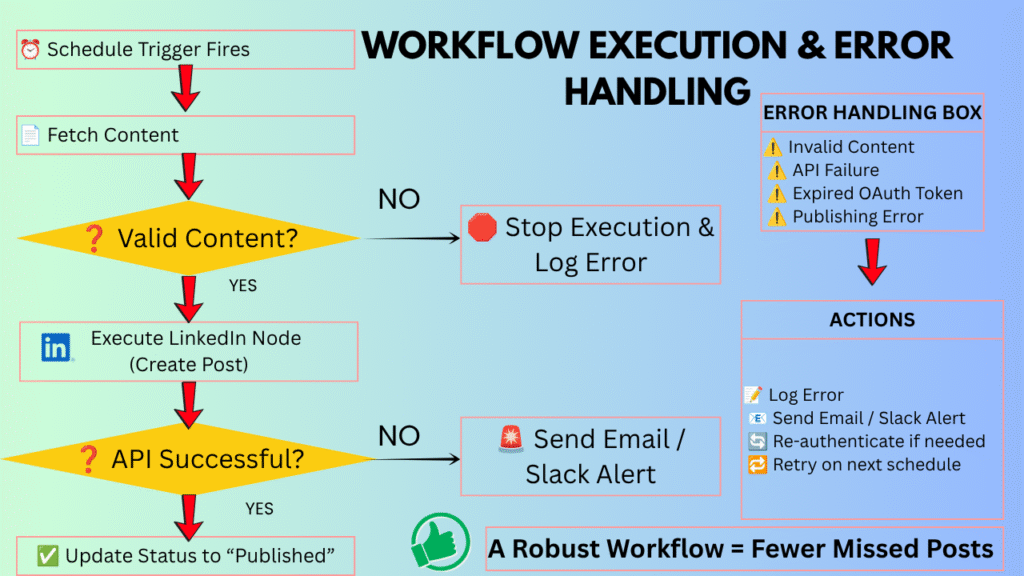
How to Test Safely
- Click Execute Node on individual nodes sequentially to verify data output structures.
- Send a private test post or run a test against a sandbox testing page before posting to your personal profile network.
- Verify that the post layout, spacing, and links render correctly on both desktop and mobile screens.
Handling Expired OAuth Tokens
LinkedIn access tokens can expire or become invalid, so your workflow should include a way to detect authentication failures and reconnect the account when necessary. If your workflow suddenly stops running and returns a 401 Unauthorized error:
- Check your n8n Credentials section.
- Re-authenticate the OAuth2 connection to refresh your access token.
- Add an Error Trigger Node in n8n connected to an Email or Slack alert so you get notified instantly if an automated post fails to publish.
Step 5: Advanced Automation Strategies
Once your basic scheduling pipeline is operational, you can extend n8n’s logic to turn simple automation into an intelligent content engine.
1. Pulling Industry Trends via RSS Feeds
Instead of manually hunting for industry news every day, connect an RSS Feed Read node to reputable technical blogs or news outlets.
- Use a Filter Node to screen articles by specific keywords.
- Pass the top relevant article URL to an AI node to summarize key takeaways into a quick, digestible LinkedIn update.
- Send the output to your review queue.
2. Conditional Branching with If/Else Logic
Use n8n’s Switch or If Nodes to handle different content formats dynamically:
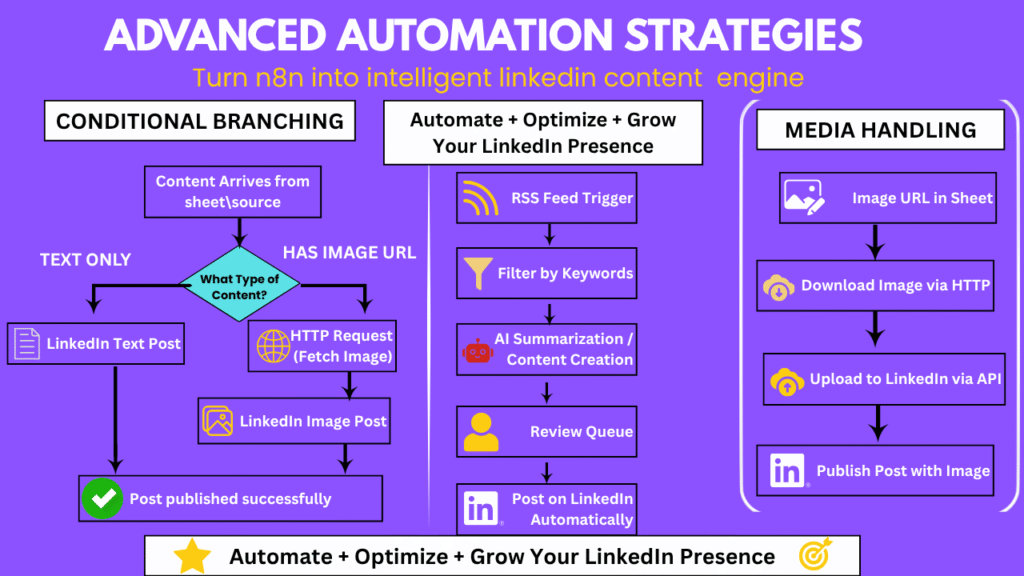
3. Handling Media Uploads via HTTP Request
Publishing images or custom carousel PDFs requires uploading the media binary to LinkedIn’s asset server first, obtaining an asset ID, and attaching that ID to your post payload. Using n8n’s native HTTP Request Node, you can easily fetch an image binary from any publicly hosted URL and pass it directly to LinkedIn’s API endpoints without storing files locally.
Best Practices: Keeping the Human Element Intact
While automated workflows handle mechanical tasks beautifully, totally unmonitored AI content creation often yields robotic, generic posts that alienate audiences.
To keep your personal brand authentic:
- Maintain a Human Review Gate: Always include a manual status toggle (e.g., changing a row status in Google Sheets from “Draft” to “Approved”) before n8n picks it up.
- Respond to Comments Manually: Automation should publish your thoughts, not replace real human conversations. Once your post is live, hop into the comment section yourself to interact with readers.
- Monitor Performance Analytics: Periodically check your post performance to see which automated topics drive actual engagement, and refine your content queue accordingly.
Summary Checklist Before Launching
| Step | Action Item | Status |
|---|---|---|
| 1. Environment | n8n Cloud or Self-Hosted Docker instance live | Ready |
| 2. API Access | LinkedIn Developer App created with “Share on LinkedIn” scope | Ready |
| 3. Content Source | Google Sheet or Notion DB configured with status columns | Ready |
| 4. Workflow Mapping | n8n nodes mapped, formatted, and tested successfully | Ready |
| 5. Error Alerts | Slack/Email notification node configured for failed runs | Ready |
By offloading the repetitive mechanics of content publishing to n8n, you eliminate daily friction, guarantee algorithmic consistency, and free up precious time to focus on what actually matters—delivering genuine insight to your professional network.
Frequently Asked Questions
It means building a workflow that handles the repetitive parts of posting — pulling content from a
source like Google Sheets or an RSS feed and pushing it to your profile — instead of you
logging in manually every time you want to share something.
Because “when I think of it” turns into gaps in your feed pretty quickly once life gets busy. A
scheduler keeps your presence steady regardless of how packed your week is, which matters
more for the algorithm — and your audience’s memory of you — than people expect.
A little fiddly your first time through, mostly because LinkedIn buried their developer portal
somewhere that clearly wasn’t designed with beginners in mind. That said, it’s a one-time thing
— set up a developer account, grab your credentials, drop them into the node in n8n, and you’re
basically done for good.
Yes — hook up an OpenAI or Claude node and it’ll turn a rough topic into a drafted post for you.
Read it before it goes out, though, so it still sounds like a person wrote it. Ideally you.
Cloud if you just want to get moving without managing infrastructure. Self-hosted if you’ve got
specific privacy requirements or want full control over your setup. Both work fine with the
LinkedIn integration either way.
Track it. Log engagement metrics somewhere centralized and look for patterns over weeks, not
days. What resonates becomes pretty obvious once you’re actually looking at the data instead
of guessing.
Yes — pull the image URL from your data source and attach it through the workflow. Just
double-check file size and format requirements first, since that’s the usual culprit when an
upload fails.
Check the execution log in n8n first — it’ll usually point right at the failure. Most of the time it’s
an expired API token or a mapping issue, both of which are quick fixes once you know where to
look.