Facebook Marketing for Beginners: A Complete Guide to Getting Started
Starting a Facebook page for a business sounds easy enough—until you publish your first few posts and realize almost no one is seeing them. Most business owners set up a page, upload a logo, post “We’re open for business!”, and wait for customer inquiries that never arrive. When nothing happens after a couple of weeks, frustration sets in, leaving many to wonder if organic reach is dead or if a massive advertising budget is required.
Simply having a Facebook Page and dropping product photos onto it occasionally is not a strategy. Facebook marketing for beginners doesn’t have to be overwhelming or ridiculously expensive. You don’t need a degree in data science; you just need a practical, step-by-step plan that focuses on real human connection, consistent posting, and understanding what your audience actually cares about.
What Is Facebook Marketing?
At its core, Facebook marketing is the practice of using the platform to promote your brand, connect with potential customers, and grow your business. It divides into two main pathways:
- Organic Facebook Marketing (Free): Involves creating a Business Page, publishing helpful posts, uploading short videos or Reels, replying to comments, and interacting in Facebook Groups. You build trust and reach people naturally through valuable content.
- Paid Facebook Advertising (Budgeted): Uses Meta Ads Manager to pay Facebook to show your content, images, or videos to a highly specific audience based on location, interests, demographic data, and online behavior.
A healthy Facebook marketing strategy usually starts with organic efforts to establish your brand voice and learn what your audience likes. Once you identify what works, you can use paid ads to amplify your reach and drive direct leads or sales.
Why Facebook Marketing Matters for Businesses
Despite newer platforms competing for attention, Facebook remains one of the largest active online communities in the world, making it a vital hub for small business marketing. Practical Facebook marketing allows you to:
- Build Brand Awareness: Introduce your business to local community members or global buyers who wouldn’t otherwise discover you.
- Reach Potential Customers: Help people find your business when they search for specific services, products, or recommendations.
- Increase Engagement: Spark real conversations, gather feedback, and answer customer questions directly.
- Generate Website Traffic: Share links to blog posts, product pages, or scheduling calendars to turn followers into website visitors.
- Generate Leads: Collect email signups, quote requests, or consultation bookings directly through your page or direct messages.
- Build Relationships: Humanize your brand by showing the real people, values, and stories behind your day-to-day operations.
How to Start Facebook Marketing as a Beginner
Follow this step-by-step setup process to avoid common amateur mistakes:
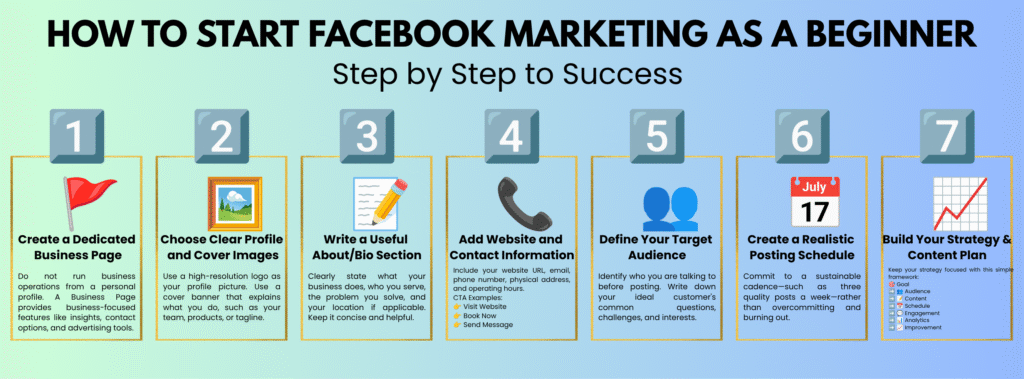
- Create a Dedicated Business Page: Do not run business operations from a personal profile. For most businesses, a dedicated Facebook Business Page is a better choice because it provides business-focused features such as insights, contact options, and advertising tools.
- Choose Clear Profile and Cover Images: Use a high-resolution logo (or professional headshot for solo creators) as your profile picture. Use a cover banner that immediately explains what you do, such as showcasing your team, flagship products, or brand tagline.
- Write a Useful About/Bio Section: Clearly state what your business does, who you serve, the problem you solve, and your physical location if applicable. Keep it concise and helpful.
- Add Website and Contact Information: Include your website URL, email address, phone number, physical address, and operating hours. Select an explicit Call-to-Action (CTA) button for your page header, such as “Visit Website,” “Book Now,” or “Send Message.”
- Define Your Target Audience: Identify who you are talking to before posting. Write down your ideal customer’s common questions, challenges, and interests so your content speaks directly to them.
- Create a Realistic Posting Schedule: Commit to a sustainable cadence—such as three quality posts a week—rather than overcommitting and burning out.
Building Your Strategy & Content Plan
Random posting leads to random results. A simple framework keeps your strategy focused:
$$\text{Goal} \longrightarrow \text{Audience} \longrightarrow \text{Content} \longrightarrow \text{Schedule} \longrightarrow \text{Engagement} \longrightarrow \text{Analytics} \longrightarrow \text{Improvement}$$
Types of Content to Post
If you only post “Buy my product!” day after day, people will unfollow your page. The best Facebook content strategy blends education, connection, entertainment, and subtle promotion
- Educational Posts & Tutorials: Share practical information, quick tips, or step-by-step guides that solve a specific problem for your reader.
- Short Videos and Reels: Vertical short-form videos are currently favored by Facebook’s discovery algorithm, making them ideal for reaching non-followers.
- Behind-the-Scenes: Show how products are made, introduce staff, or tour your workspace to build authenticity and trust.
- Customer Stories & Social Proof: Share reviews, testimonials, or client before-and-after photos.
- Questions and Polls: Simple, open-ended questions encourage followers to leave comments and boost interaction.
- Promotional Content: Announce sales, showcase new services, or launch products. Keep promotional content balanced with educational, entertaining, and community-focused posts so your page does not feel like a constant sales pitch.
Posting Frequency: Quality Over Quantity
Quality and consistency matter vastly more than raw frequency. For many small businesses, a consistent schedule of around three to four quality posts per week can be a practical starting point. However, the ideal frequency depends on the audience, content type, and business goals.
How to Increase Facebook Engagement
Posts that encourage meaningful interactions can have more opportunities to reach people, so creating content that starts genuine conversations can be useful. To boost post visibility and grow your reach:
- Ask Specific Questions: Instead of general questions, ask targeted ones (e.g., “What’s the #1 plant you’ve accidentally killed?”).
- Write Captions with a Hook: Hook the reader in the first sentence before the “See More” button cuts off your text.
- Use Visuals When They Add Value: Clean images, infographics, or native videos perform significantly better than text-only updates.
- Reply to Every Comment Promptly: Engage with commenters and ask follow-up questions to keep the conversation going.
- Address Audience Pain Points: Turn common customer questions from emails or store visits into standalone posts.
Organic Marketing vs. Facebook Ads
Understanding the differences between organic reach and paid advertising helps set realistic expectations:
Feature | Organic Facebook Marketing | Facebook Advertising |
Upfront Cost | Free (requires time/effort) | Requires a daily or campaign budget |
Speed of Results | Slow and steady growth over time | Can provide faster reach and campaign data |
Audience Reach | Existing followers + algorithm distribution | Anyone targeted based on demographics/interests |
Level of Control | Dependent on algorithm distribution | More control over audience targeting, placement, budget, and timing |
Long-Term Value | Builds authentic trust, brand authority | Excellent for direct lead generation & fast sales |
Best Used For | Community building, customer service | Product launches, targeted offers, quick leads |
The optimal approach is using both together: build an authentic brand presence with organic posts, and use targeted Facebook Ads to amplify high-performing content or specific business offers.
Facebook Advertising Essentials
When you are ready to explore Meta Ads Manager, focus on these core campaign components:
- Campaign Objective: Define what you want to achieve (e.g., Website Traffic, Post Engagement, or Lead Generation).
- Target Audience: Select who sees your ad based on location radius, age, gender, interests, and online behaviors.
- Ad Creative and Copy: Create compelling visuals (images or video) paired with clear headlines and text.
- Call to Action (CTA): Include an action button like “Learn More,” “Shop Now,” or “Sign Up.”
- Budget & Testing: Start with a budget you can afford to test without putting your overall marketing budget at risk. A small test campaign can help you compare different audiences, creatives, and objectives before increasing your spending.
Essential Facebook Marketing Tools
Using the right digital utilities helps streamline daily workflow and content creation:
- Meta Business Suite: Facebook’s native tool for scheduling posts, managing unified inboxes, and reviewing analytics.
- Graphic Editors (e.g., Canva): Helps design post graphics, Stories, and cover banners using pre-sized templates.
- Branding & Image Tools: Utilize AI logo creators and specialized image search engines to source visual brand assets.
- Link Shorteners & QR Code Generators: Clean up long destination links in captions and bridge offline physical traffic to your online page.
- Copy & Design Utilities: Use word counters for caption readability and color pickers for visual brand consistency.
Common Beginner Mistakes to Avoid
- ❌ Posting Only Promotional Content: Focus on providing genuine value before asking for a sale.
- ❌ Buying Fake Followers: Inactive bot accounts ruin your engagement rate and corrupt audience analytics.
- ❌ Ignoring Comments and Messages: Neglecting questions alienates potential customers and damages brand trust.
- ❌ Inconsistent Posting: Posting randomly in bursts confuses the algorithm and kills momentum.
- ❌ Trying to Target Everyone: Narrow your focus to the specific group of people most likely to buy from you.
- ❌ Spending Money Without a Strategy: Boosting random posts without a clear goal or follow-up plan wastes ad budget.
Measuring Success: Key Metrics Matrix
Track performance inside Meta Business Suite Insights using these core metrics:
- Reach: The number of unique individual accounts who saw your post.
- Impressions: Total times your content was displayed on screens (one user seeing a post three times equals 1 reach and 3 impressions).
- Engagement: Total actions taken on your post (likes, comments, shares, clicks).
- Link Clicks: Number of times users clicked an embedded link to visit your landing page.
- Cost Per Result (for Ads): The average spend required to achieve your campaign objective (e.g., cost per click or lead).
A Simple 30-Day Action Roadmap
If you are unsure where to start, follow this 4-week framework:
- Week 1 (Foundation & Setup): Create or audit your Business Page. Complete your bio, contact info, visual assets, and CTA button. Identify your target audience and list 10 common customer questions.
- Week 2 (Content Launch): Draft and publish 3 high-value educational posts answering those core questions. Include clean visuals with each post. Invite existing contacts and subscribers to follow the page.
- Week 3 (Engagement Focus): Publish 3 to 4 posts, including at least one short Facebook Reel or video. Ask open-ended questions in captions and reply to every comment and message received.
- Week 4 (Review & Improve): Review Meta Insights to identify top-performing post formats. Analyze why they succeeded and plan out the upcoming month’s content calendar based on those data insights.
Frequently Asked Questions
Is Facebook marketing free?
You can start Facebook marketing organically without paying for ads. Creating and managing a Facebook Page does not require an advertising budget, although your business may have other marketing or content-related costs. Paid ads are an optional tool to accelerate reach.
How often should a beginner post on Facebook?
A great baseline for small businesses is 3 to 4 times per week. Prioritize high-quality, valuable content over rushed daily posts.
Can I grow my business on Facebook without paying for ads?
Yes. Many businesses grow organically by sharing helpful tips, producing engaging Reels, providing strong customer service, and participating in relevant local community groups.
How much should a beginner spend on Facebook Ads?
Start with a small budget of $5 to $10 per day. This provides enough real-world data to test ad graphics, copy, and targeting without overspending.
Conclusion: Start Small and Stay Consistent
Success on Facebook boils down to a repeatable formula: set up a clean Business Page, publish valuable content that helps or entertains your audience, engage genuinely with followers, and track performance to improve over time.
Don’t worry about trying every single strategy or feature on day one. Start by setting up your page, drafting your first few helpful posts, and maintaining a consistent schedule. As your confidence builds, scale your efforts into video Reels and small ad campaigns. Focus on delivering real value, and watch your Facebook page grow into a reliable asset for your business.